
What’s New in WhatsApp June 2026?
WhatsApp will introduce the Username feature in June 2026, allowing your customers to hide their phone numbers from businesses. Since our platform currently uses phone numbers as the primary identifier, this change directly affects how incoming messages are identified and processed.
To keep everything running smoothly, our platform has adopted BSUID (Business Scoped User ID) as a unique identifier. This allows the system to recognize your customers even when their phone number is not available keeping conversation history, customer records, and message routing intact.
About WhatsApp Username and BSUID features
A username is a unique text identifier chosen by the customer themselves. Unlike WhatsApp profile names, which can be duplicated across customers, usernames cannot be reused and serve as the customer's display identity.
BSUID is a system-generated code that remains permanent and cannot be modified. While usernames operate on the customer side, BSUID works on the system side offering greater stability for long-term tracking and data processing.
What You Get with Our Platform
Every customer is consistently recognized Whether existing or new, with or without a phone number, every customer is identified consistently across all conversations.
Complete customer data capture Phone numbers, usernames, and BSUIDs are automatically stored, making it easier to manage data in your CRM and analytics platforms.
Customer history stays connected Changes to a customer's phone number are handled automatically, without breaking the continuity of their conversation history.
Broadcasts run as usual Broadcast messages reach every customer — including those using usernames — with no additional configuration required.
Impact on platform features (Omnichannel)
To ensure a seamless transition, our platform has been updated to handle WhatsApp Username and BSUID across all relevant features. Below is an overview of the features affected by this change, along with how each one continues to support your operations.
Inbox
To support the new WhatsApp identifiers, the inbox now offers expanded search capabilities and an updated customer profile view:
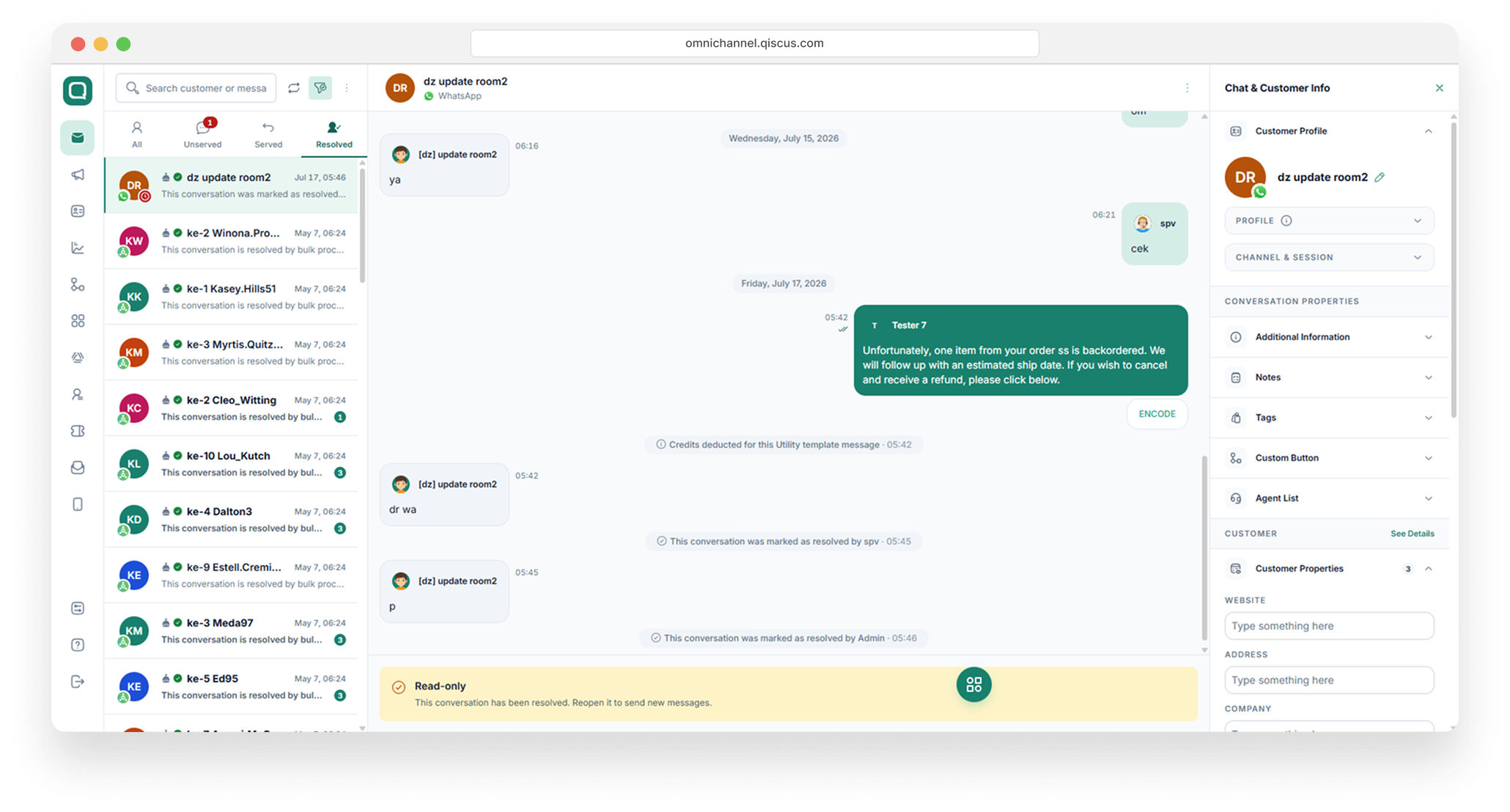
Search by Username
You can now search for specific customers using their Username, in addition to phone number and customer name.
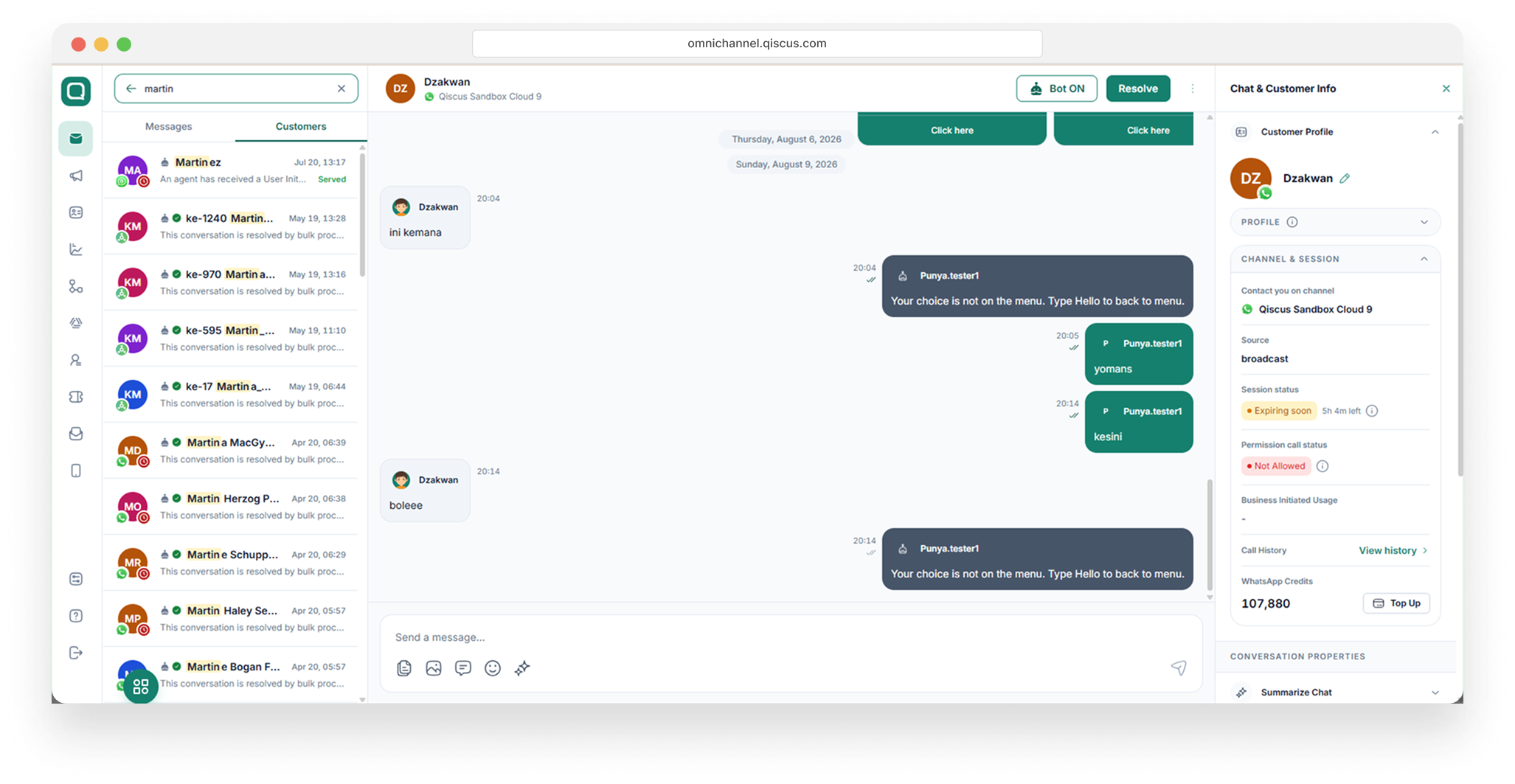
Customer Types
To identify both existing and new customers, Meta has introduced Contact Book a built-in feature that automatically stores contact information for every customer who has interacted with your business. This feature is enabled by default for all businesses and requires no setup or configuration.
Contact Book in Qiscus is adapted from Meta's latest update to ensure full compatibility. For more detailed information, please refer to Meta's official documentation
Here are the key things to know about how Contact Book works:
Enabled automatically Your business does not need to activate anything. The feature runs in the background from the start.
Phone numbers remain recognized indefinitely As long as Contact Book is active, your customers' phone numbers stay on record even when they are inactive for more than 30 days or choose to hide their number behind a username.
Customers can add contacts directly When customers share their phone number through the contact request button, Meta automatically adds their information to your Contact Book.
Not visible in WhatsApp Manager Contact Book operates behind the scenes, without a dedicated view in WhatsApp Manager. Its active status can be identified from the data received by the system.
Can be disabled, but with consequences You can disable Contact Book through Meta Business Suite → Business Settings → Business Info. Please note that disabling it will permanently delete all stored contact data, and phone numbers will only be recognized within a 30-day window from the last interaction.
Here are the use cases for identifying existing and new customers:
Existing Customer
Use case describing system behavior for existing customers
Case 1: Complete Identity Profile
Customers who have been previously registered will be identified by the system using their phone number as a unique identifier. The data used includes username, phone number, and BSUID, with the phone number serving as the primary key in the identification process.
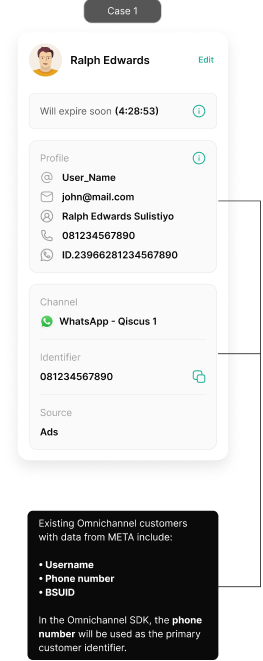
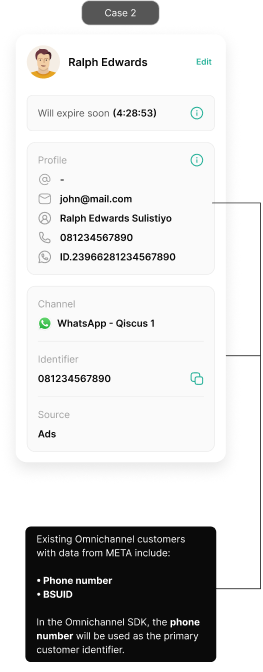
Case 2: Without Username
If the customer does not update their username. The data used includes phone number and BSUID, with the phone number serving as the primary key in the identification process.
Case 3: Without Phone Number
If the customer does not share their phone number. The data used includes username and BSUID, with the BSUID serving as the primary key in the identification process.
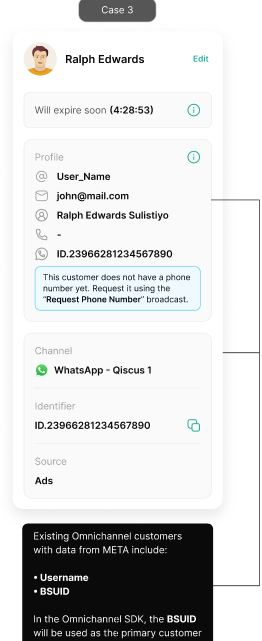
If an existing customer who has a phone number and has implemented a username does not contact the business for 30 days, he will be considered a new customer, because the webhook sent by Meta does not carry the "phone number" data.
A customer may "become a new customer" when Meta does not send the phone number data. However, this only occurs when the customer's BSUID cannot be found in the Customer Data Platform (CDP). If the customer's BSUID has already been recorded — whether the customer contacted the business previously or the business ran a broadcast to them earlier — the customer continues to be recognized under their existing profile.
New customer
Use case describing system behavior for new customers
Case 1: Complete Identity Profile
New customers will automatically use the BSUID as the unique identifier. The data used includes the username, phone number, and BSUID, with the Phone number or BSUID serving as the primary key in the identification process.
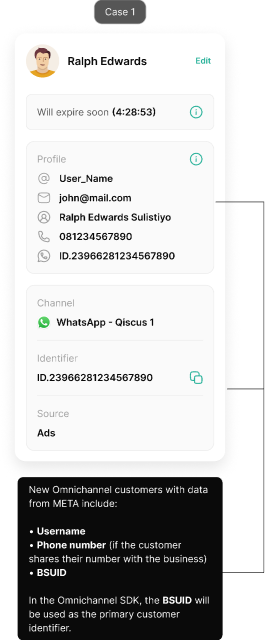
Case 2: Without Username
For new customers and returning customers, if the customer does not update their username. The data used includes phone number and BSUID, with the Phone number or BSUID serving as the primary key in the identification process.
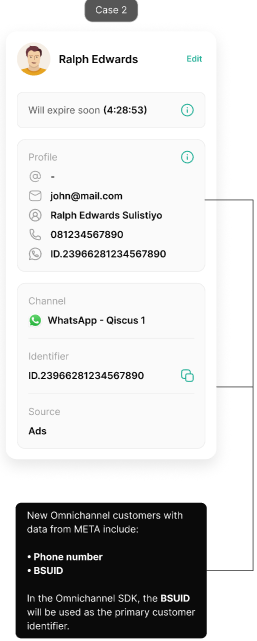
Case 3: Without Phone Number
For new customers and returning customers, if the customer does not share their phone number. The data used includes username and BSUID, with the BSUID serving as the primary key in the identification process.
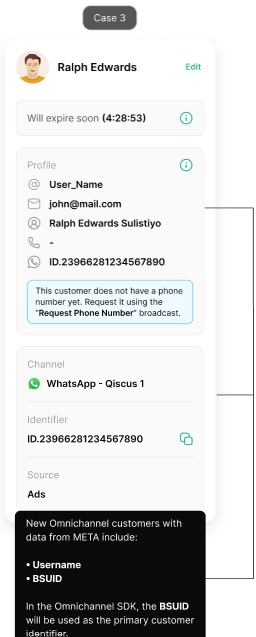
The primary key used to identify customers is determined by META global release. The default for now is phone number. When both phone number and BSUID are available, the configured identifier takes priority as the main key, and the other is stored as an alternate lookup. Case 3 always uses BSUID regardless of configuration, since no phone number is available.
A customer may "become a new customer" when Meta does not send the phone number data. However, this only occurs when the customer's BSUID cannot be found in the Customer Data Platform (CDP). If the customer's BSUID has already been recorded — whether the customer contacted the business previously or the business ran a broadcast to them earlier — the customer continues to be recognized under their existing profile.
Updated customer profile view
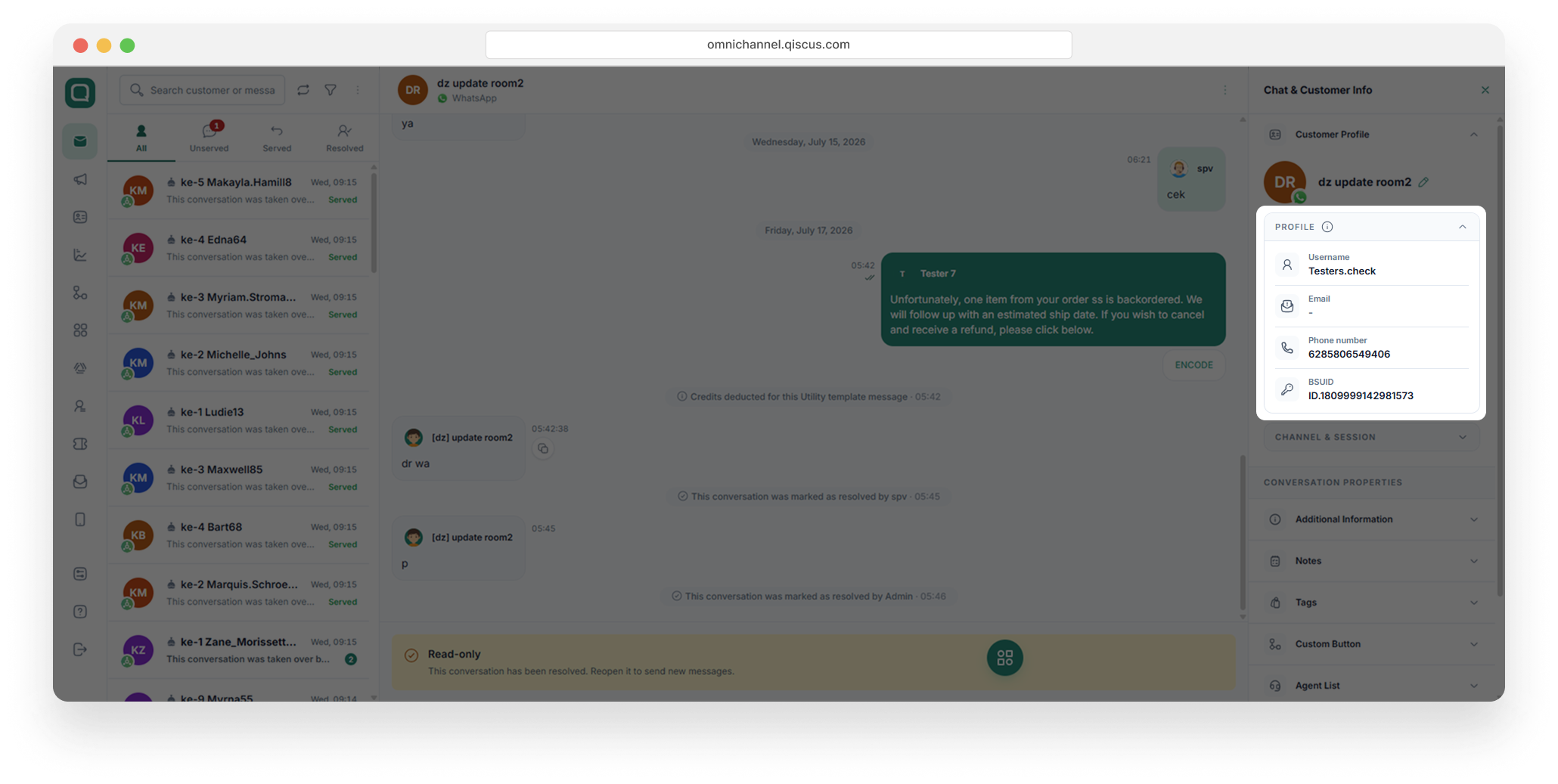
The customer profile panel has been redesigned to display Username, phone number, and BSUID in a single, organized layout.
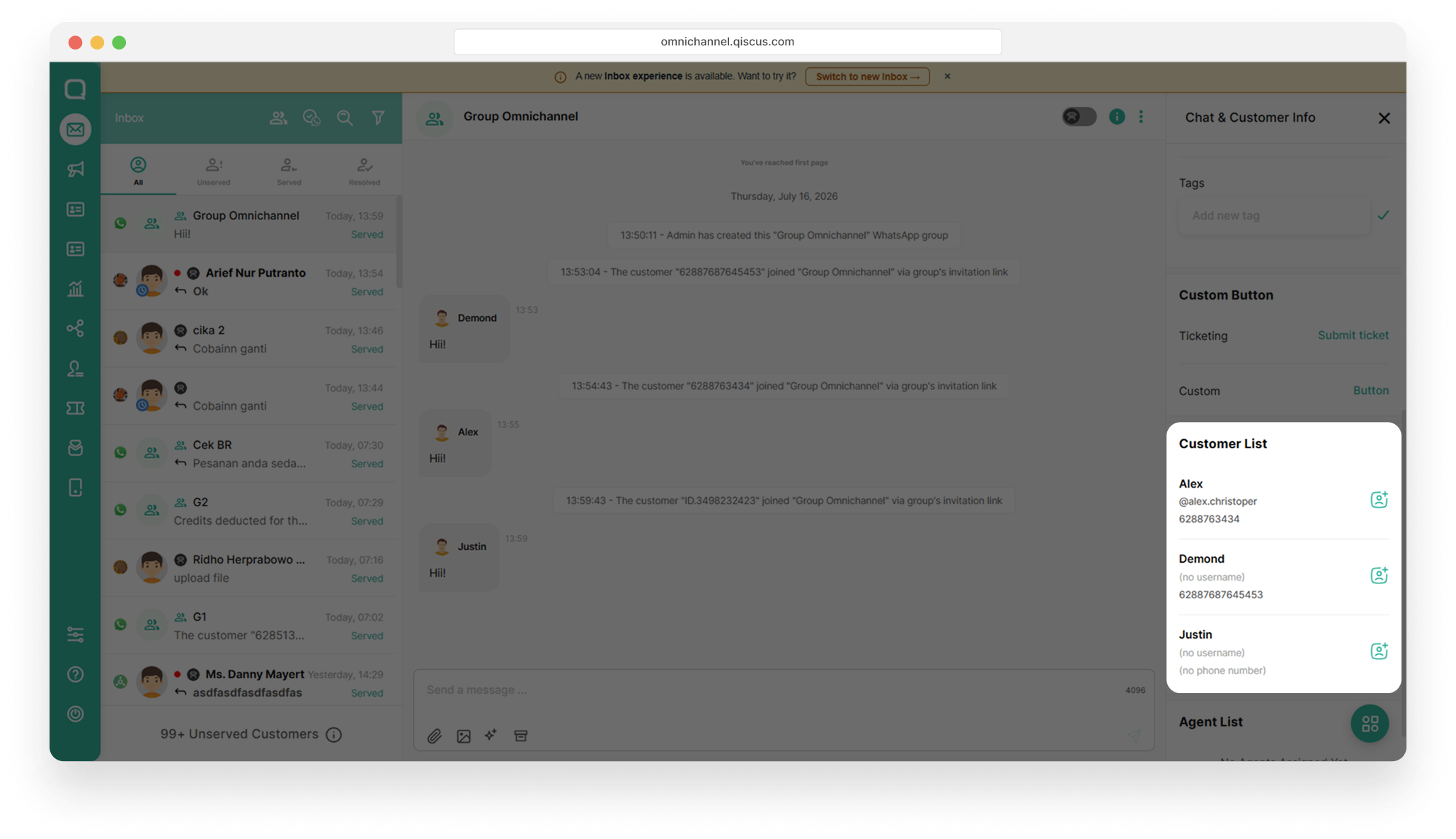
Customer group info
The customer group view adapts based on the information shared by each customer. When available, the view displays the username and phone number. If a customer has not shared their username or phone number, the corresponding fields will show "No username" or "No phone number".
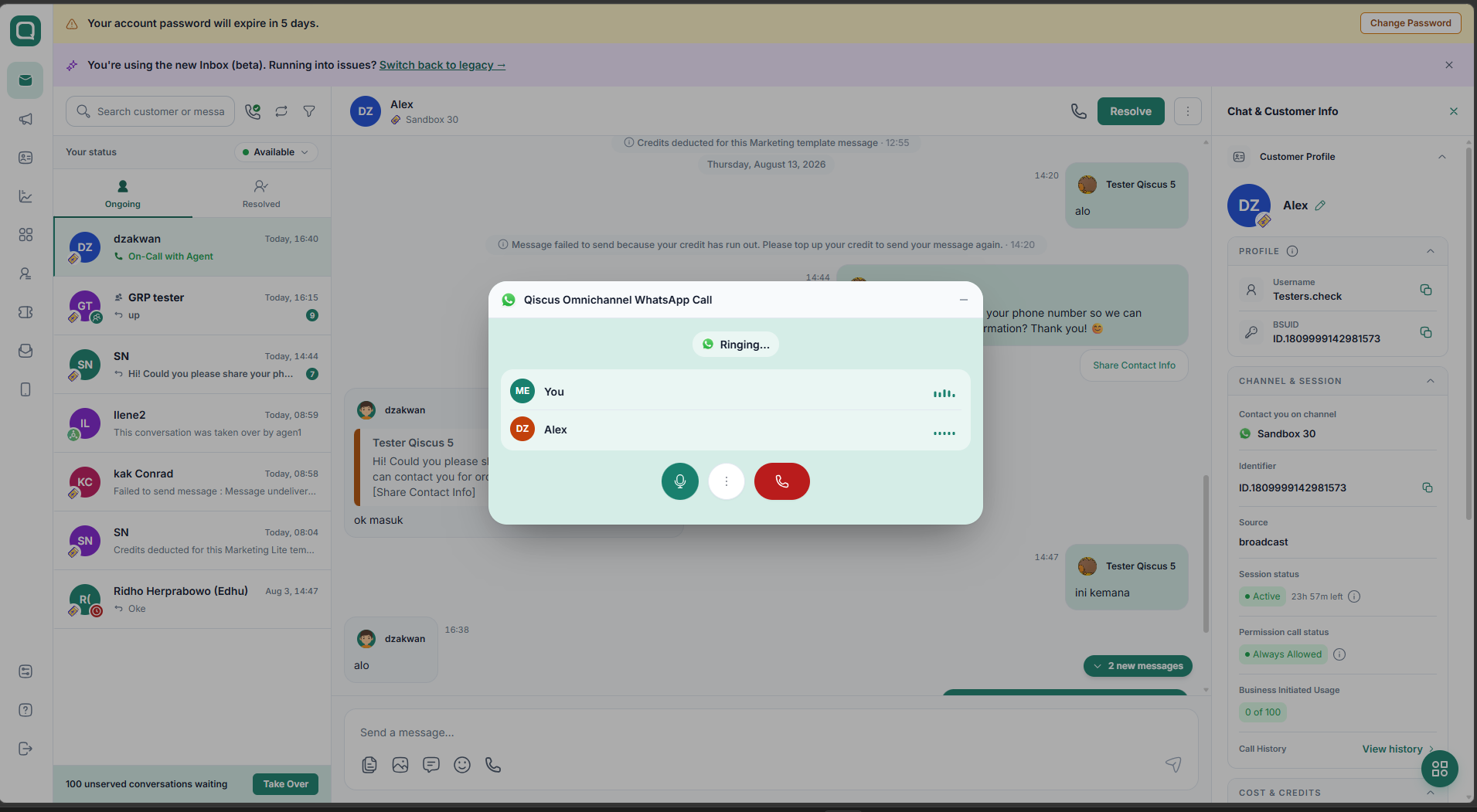
Support call with BSUID
Our platform has been updated to support Meta's new Call with BSUID feature. This allows your business to make voice calls to customers using their BSUID as the identifier without requiring their phone number keeping customer privacy fully protected throughout every interaction.
Authentication Template
This update applies specifically to Authentication Templates (AUTH Templates), which are WhatsApp message templates used for OTP delivery, account verification, login codes, and similar authentication-related purposes.
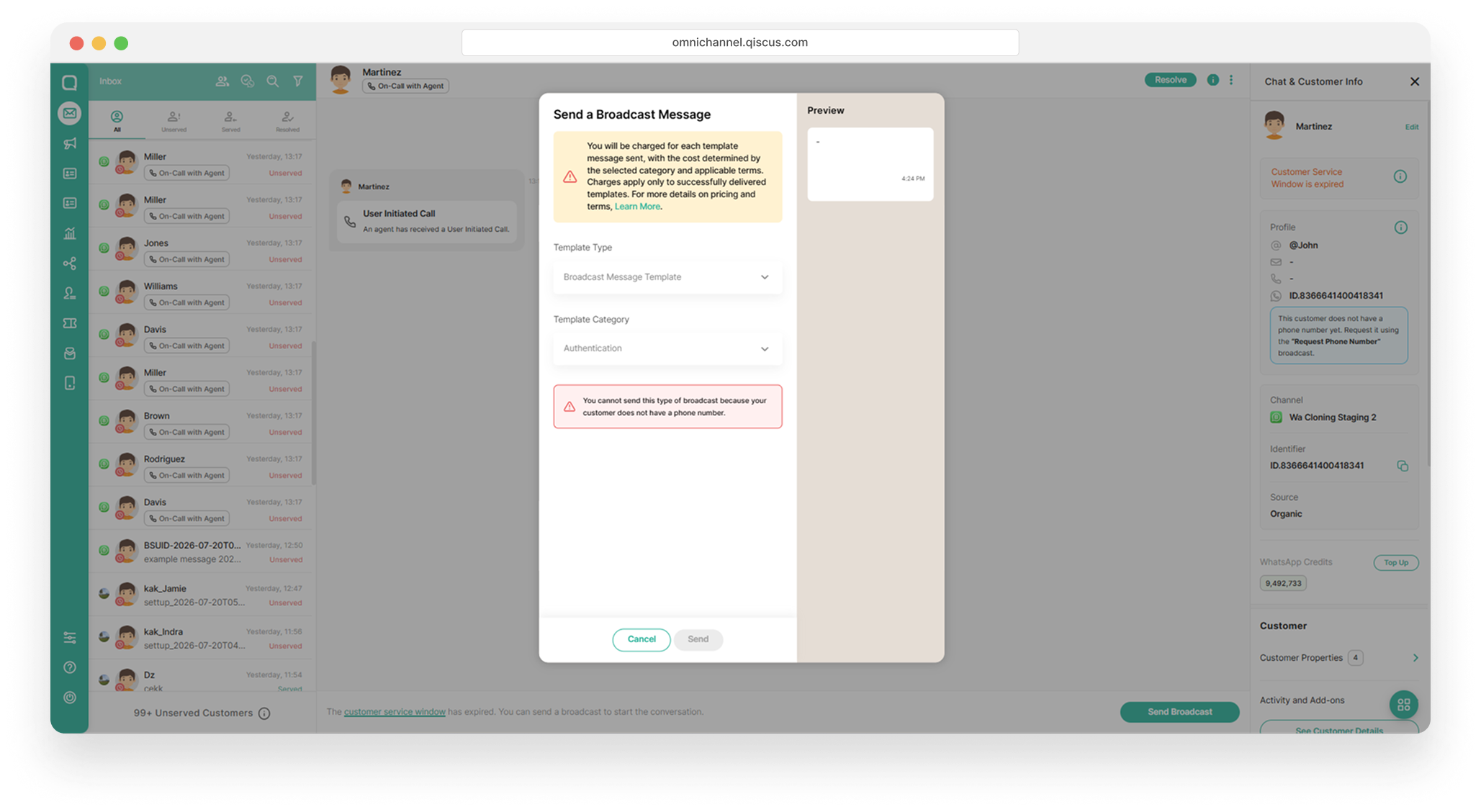
Authentication templates cannot be sent to username-only customers (customers without a phone number). This is a Meta restriction.
Create a Request Phone Number Template
Create a Request Phone Number template that allows you to request a customer’s phone number for various business purposes, such as verification, follow-up, customer support, or other needs that require direct contact with the customer.
Follow the steps below to configure the template:
In the left sidebar, open Outbound Message. Click + New Template (top right).
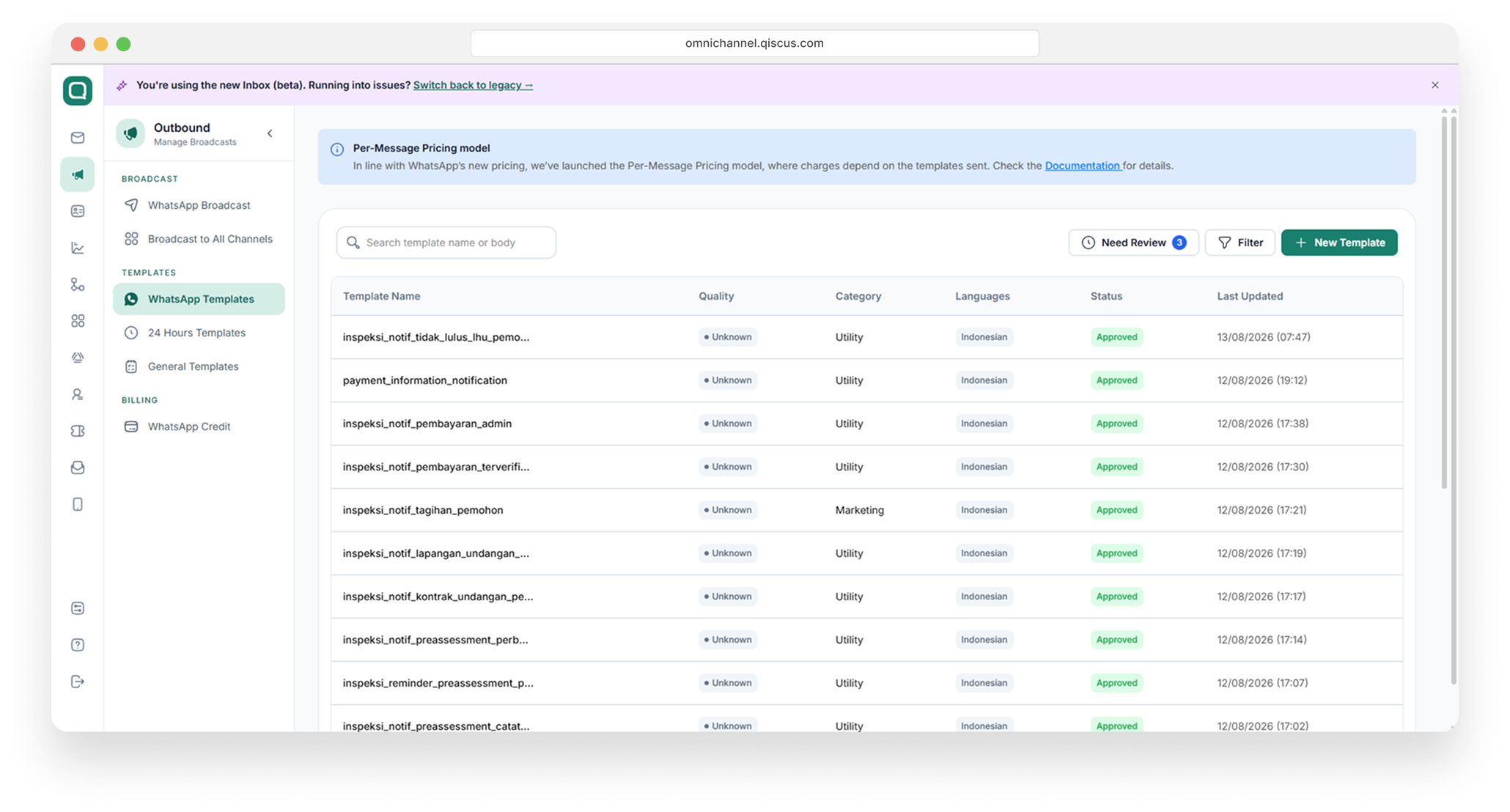
On the Template Information step, stay on the Marketing or Utility tab and select the Request Phone Number card
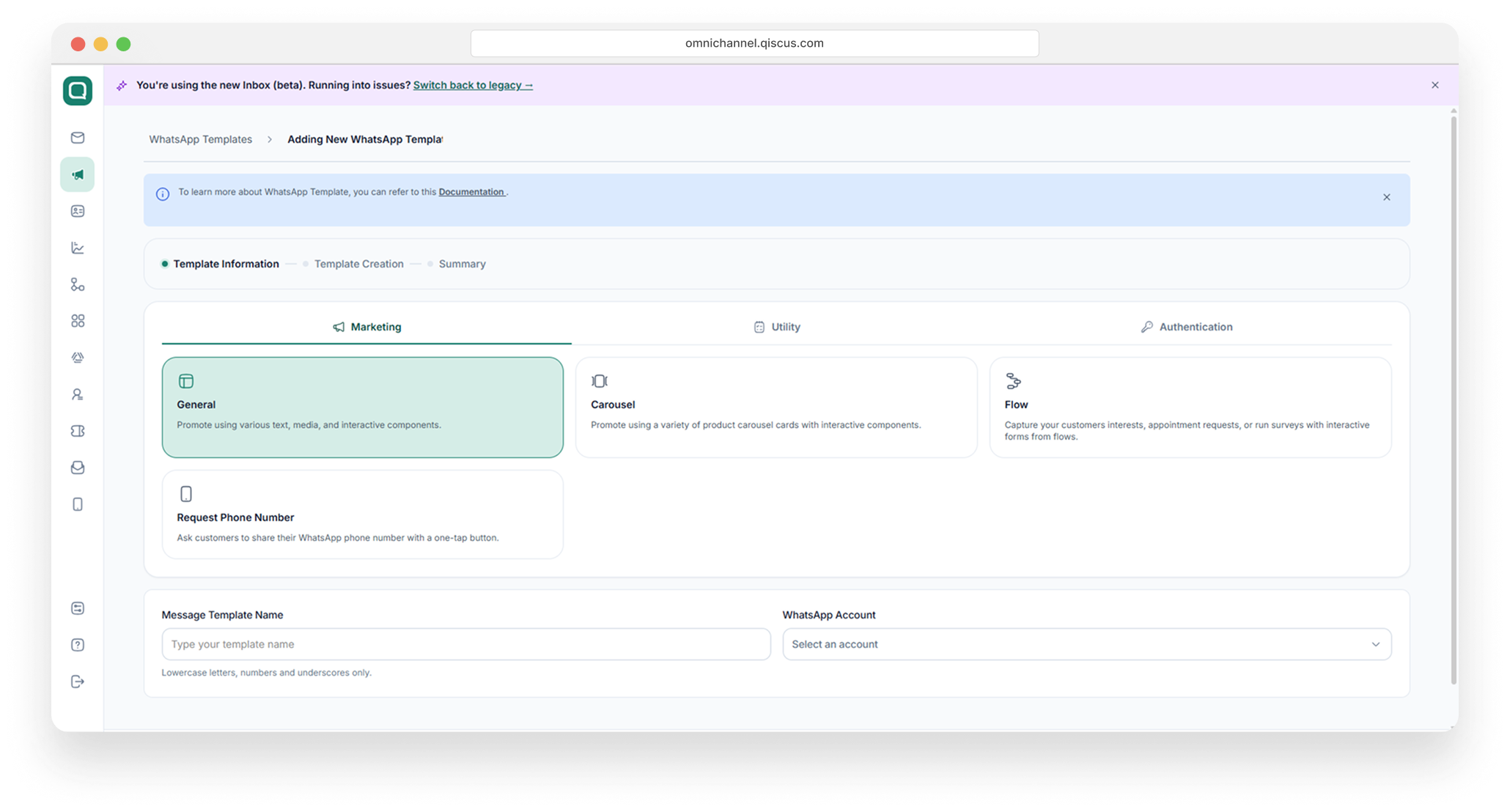
Fill in the Message Template Name (lowercase letters, numbers, and underscores only — e.g., request_phone_number) and select the WhatsApp Account the template belongs to. Then click Next.
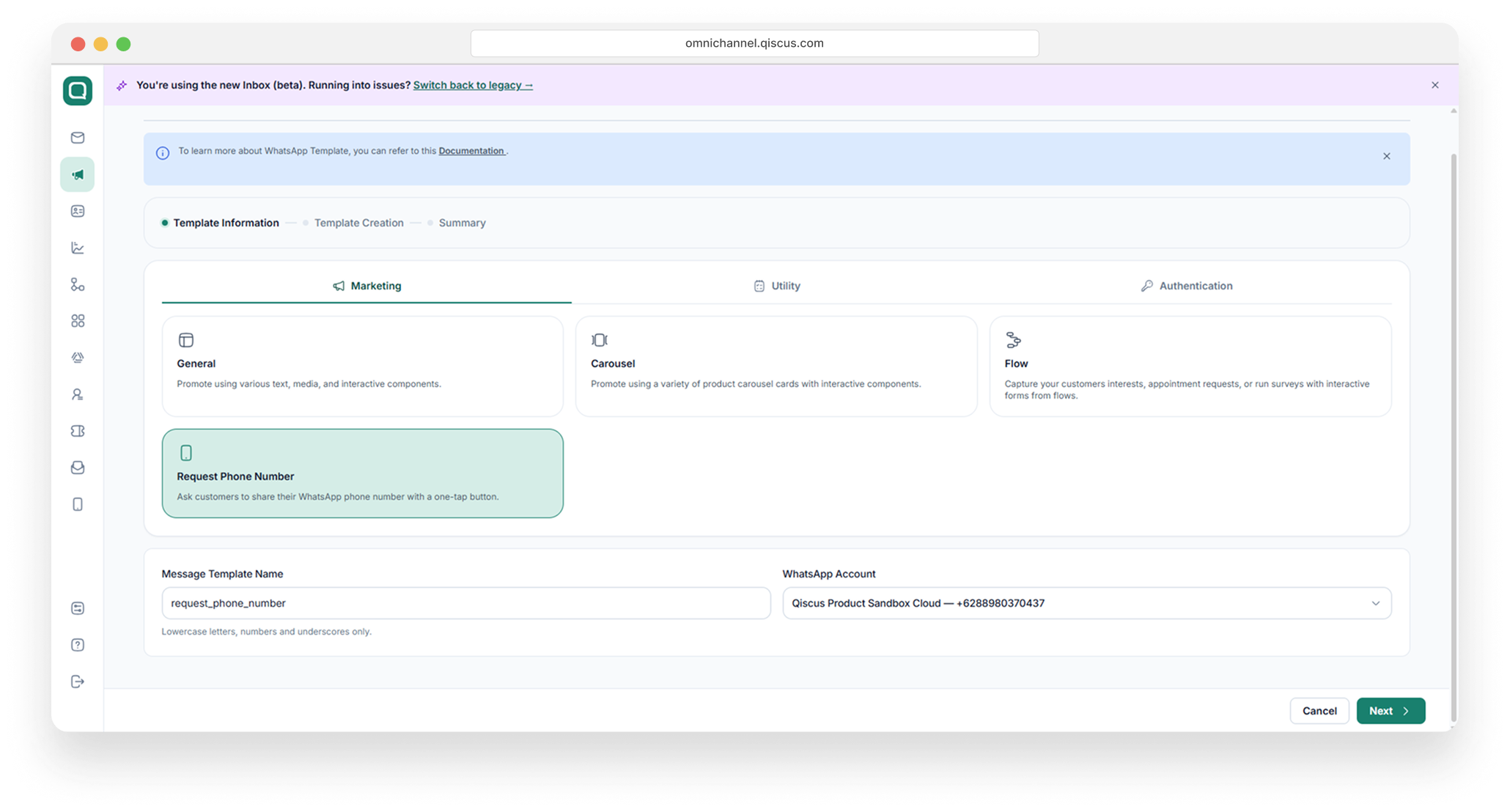
On the Template Creation step, choose the template Language. Write the message Body . You can apply bold, italic, and strikethrough formatting, and insert dynamic values with + Add Variable. The right-hand Preview shows how the message will look on WhatsApp.
After you click the Next button, you will navigate to open the Summary step, then review the Template Information (name, account, category, type, language) and Content (body and button). Then click Submit Template to complete the template creation process.
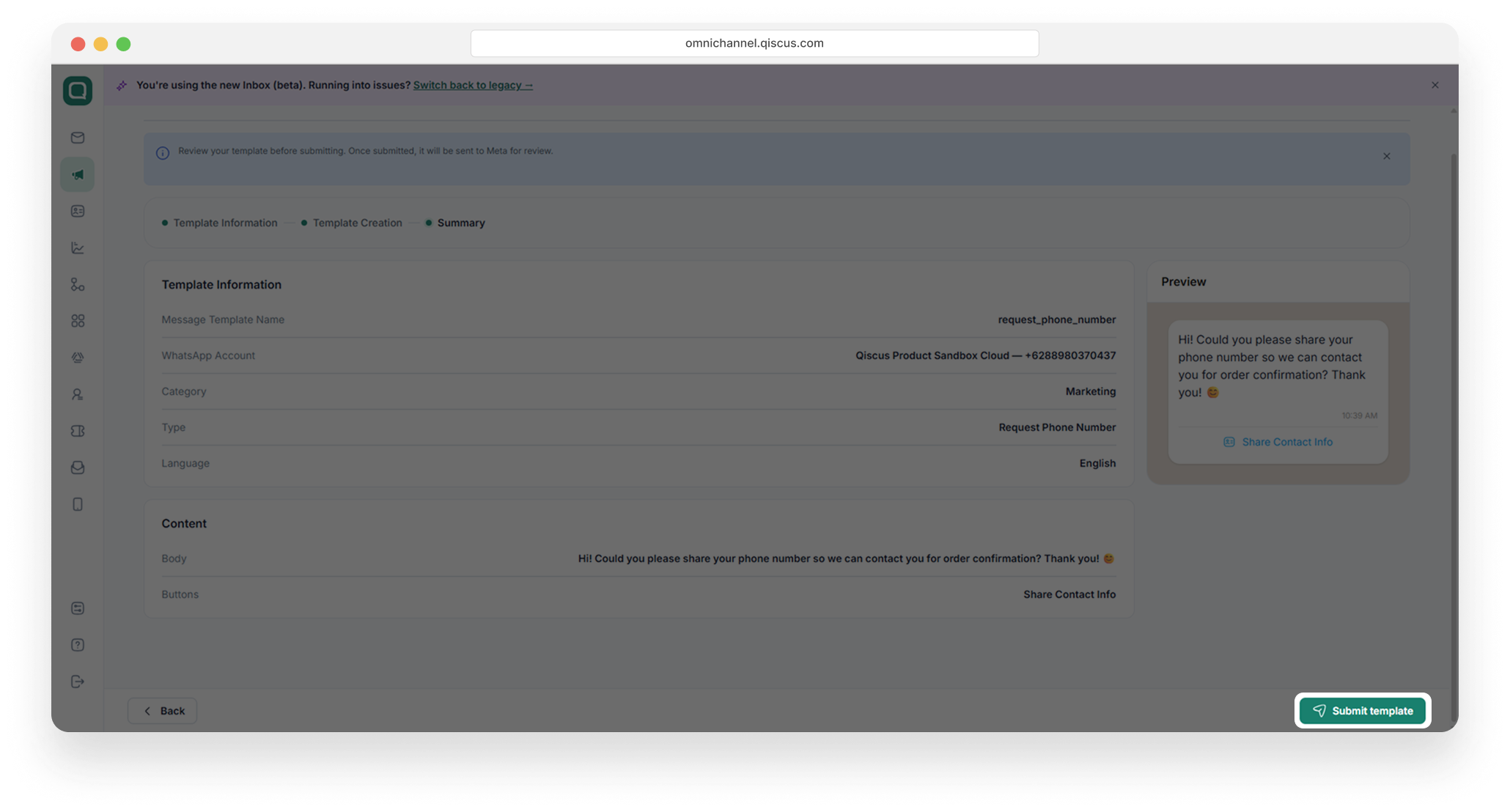
Request Phone Number
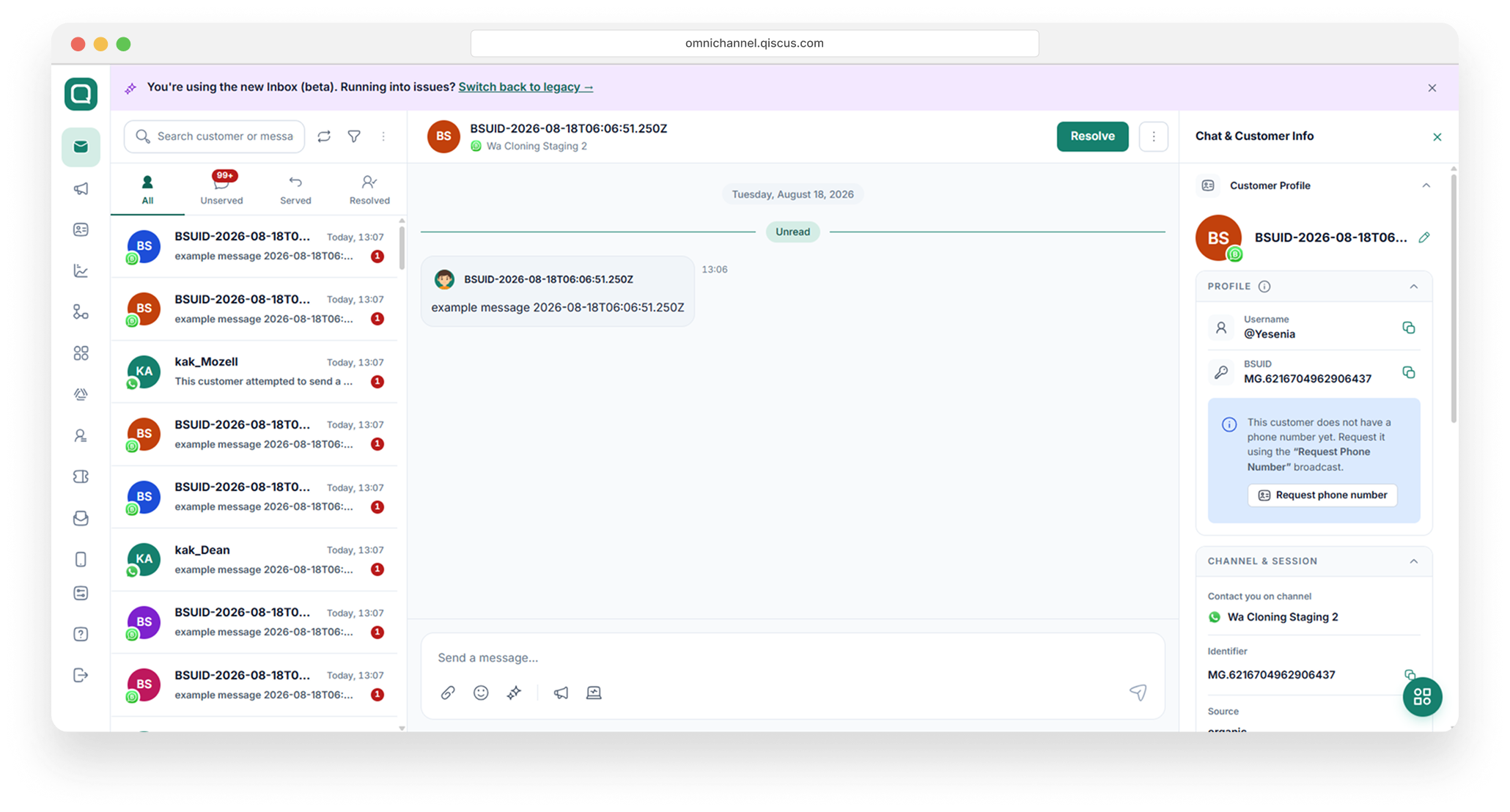
Request Phone Number lets your business ask a customer to share their WhatsApp phone number through a one-tap Share Contact Info button. This is especially useful for conversations where the customer’s phone number is not visible, for example, customers who contacted you through a Meta ad and are identified only by a Business-Scoped User ID (BSUID). Once the customer taps the button and confirms, their phone number is saved to their customer profile automatically.
There are two ways to send a Request Phone Number message from the Inbox:
• Using a template — sends an approved WhatsApp template message. Works at any time, even when the customer session has expired. Charged per template message according to WhatsApp’s per-message pricing.
• Using an interactive message — sends a free-form message with the Share Contact Info button directly from the conversation. No template approval needed, but the conversation session must still be active.
Note: In both methods, the Share Contact Info button label is set by Meta and cannot be edited. Only the message body is customizable.
Sending via Template
Use this method when you want to send the approved Request Phone Number template — including when the customer’s session window has already expired.
1. Open the customer’s conversation in the Inbox.
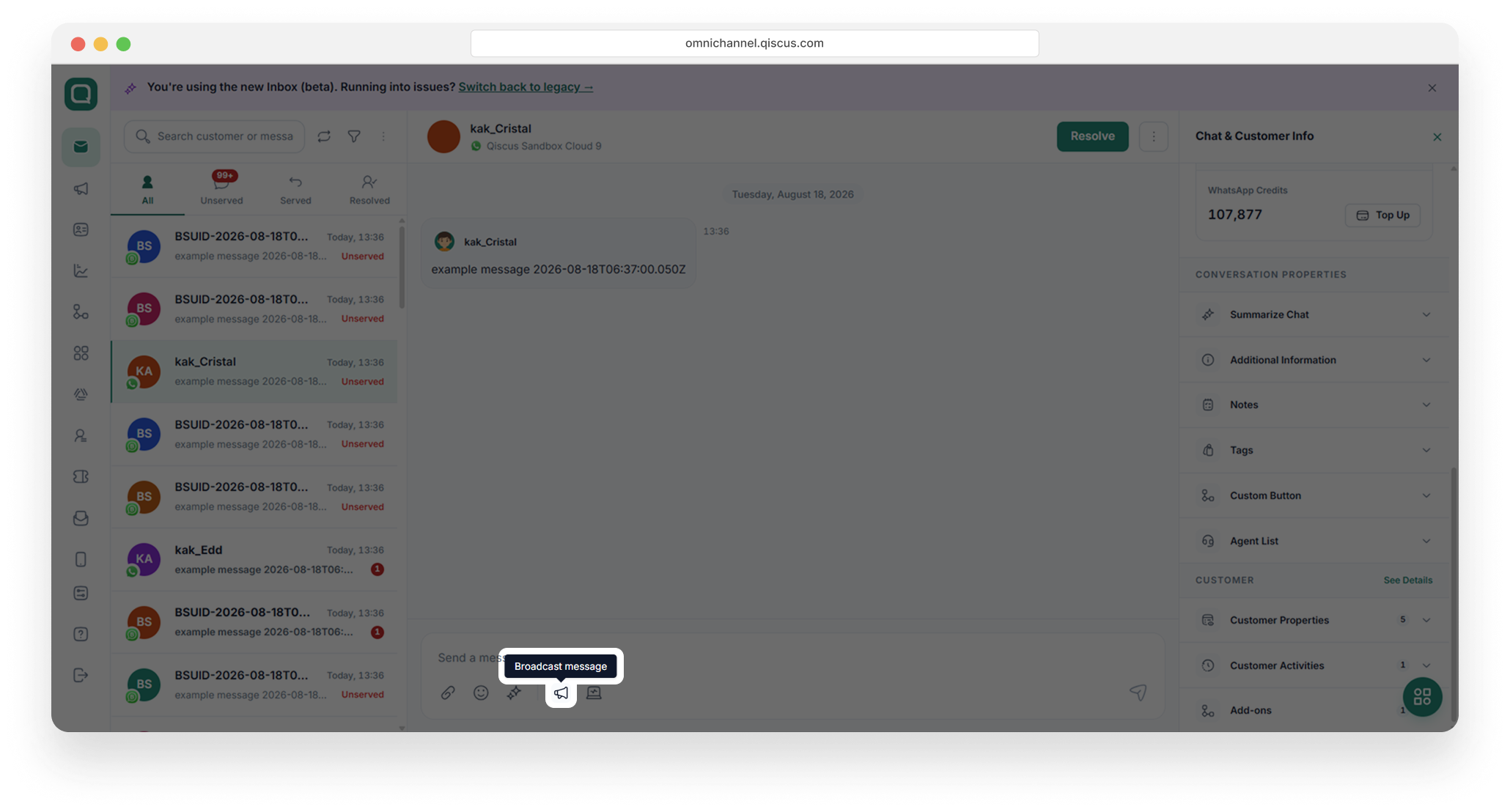
2. In the message composer at the bottom, click the template message icon (speech-bubble icon). The Send a Broadcast Message dialog opens.
3. Set Template Type to Broadcast Message Template.
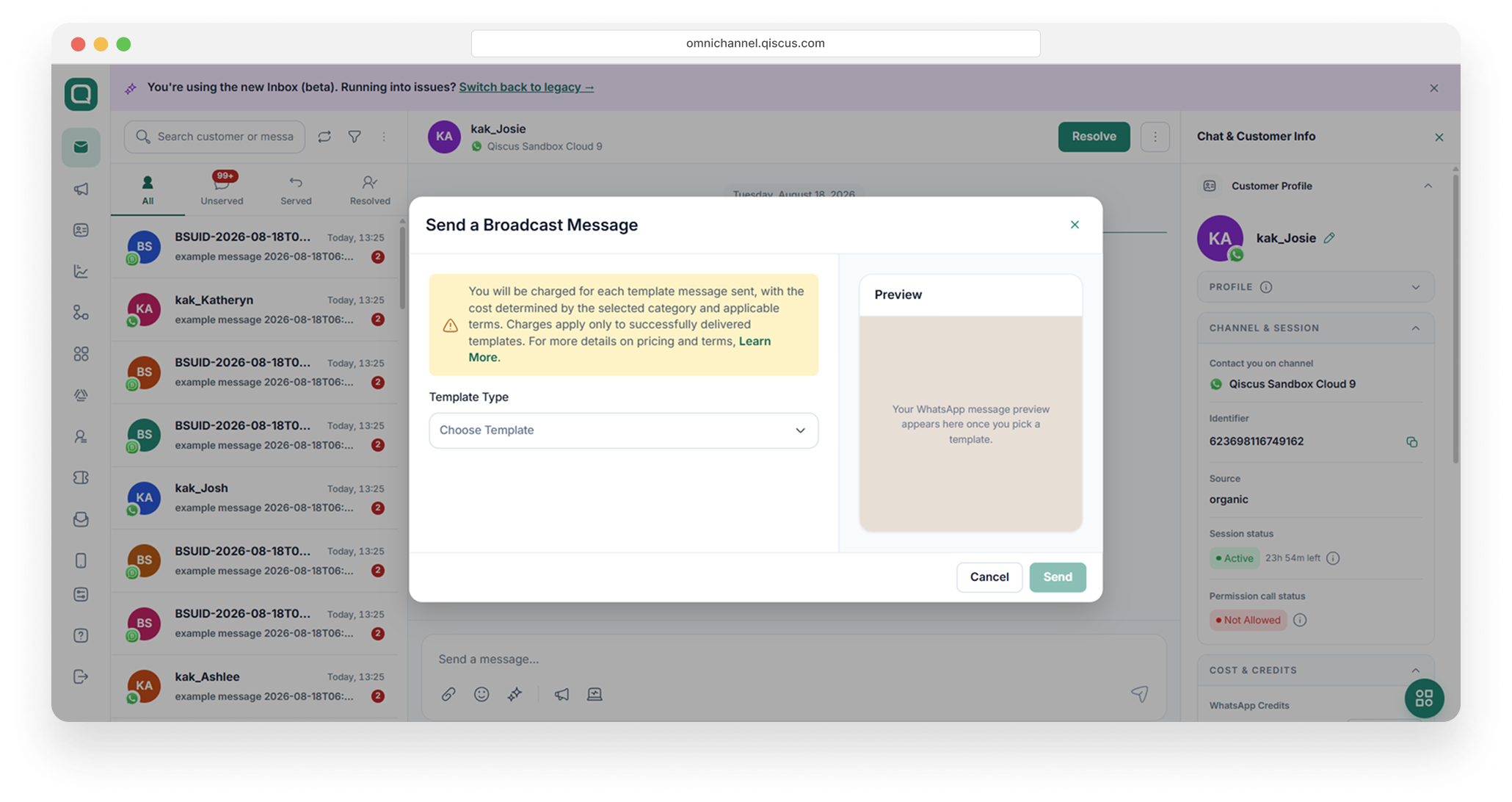
4. Set Template Category to Utility/Marketing (the category the Request Phone Number template was created under). Then click Send.
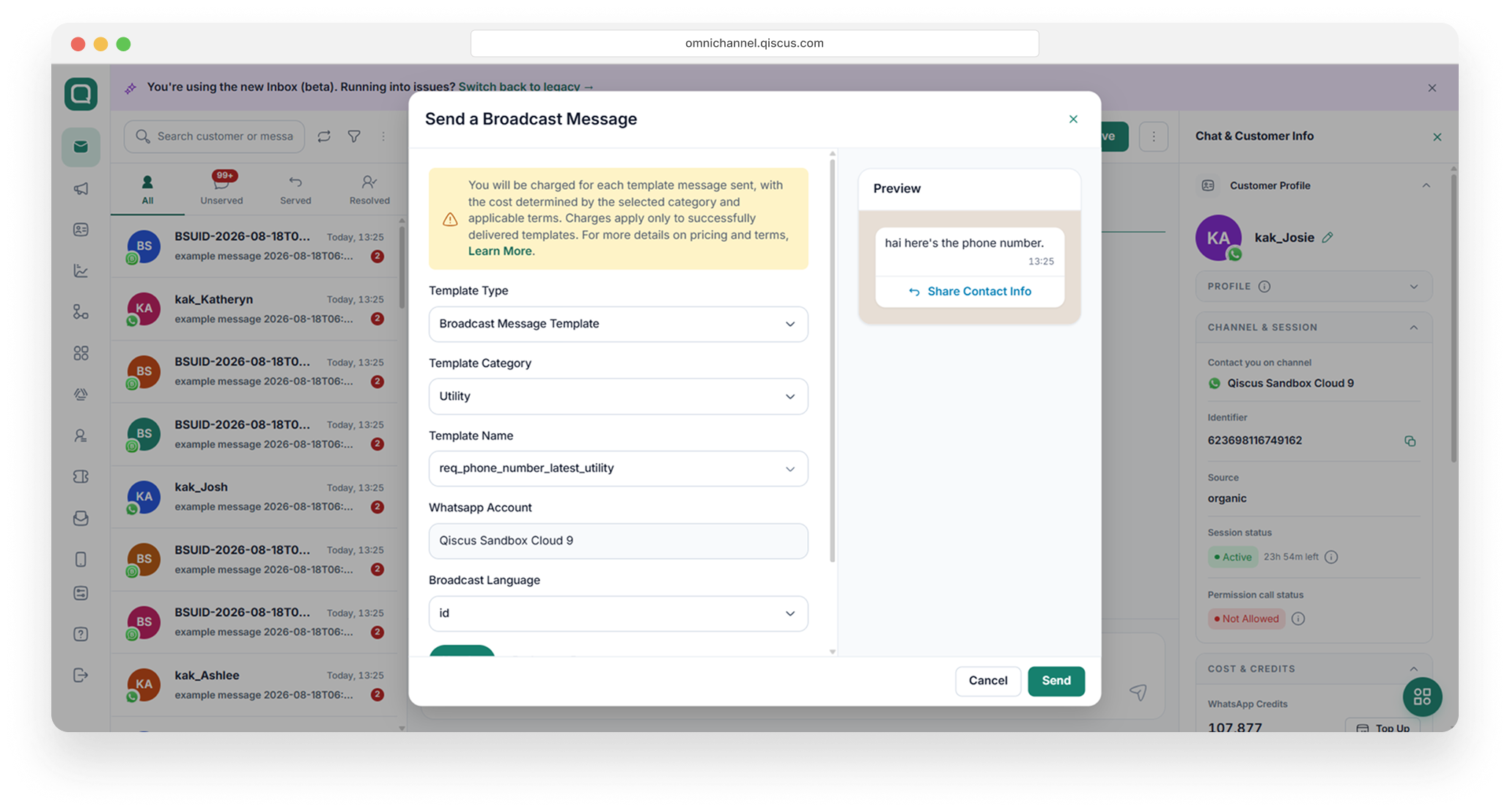
Use an approved Request Phone Number template (e.g.,
request_phone_number). WhatsApp Account and Broadcast Language are filled automatically.Make sure the Header, Body, and Button are correct, and confirm that the Preview displays the Share Contact Info button.
You are charged for each template message sent; the cost depends on the template category. A “Credits deducted for this template message” notice appears in the conversation after sending.
Sending via Interactive Message
Use this method to send a one-tap request instantly from the conversation, without picking a template. The message body is free-form; only the button is fixed by Meta.
1. Open the customer’s conversation in the Inbox.
2. In the Chat & Customer Info panel on the right, look at the PROFILE section. If the customer does not have a phone number yet, click the Request phone number button.
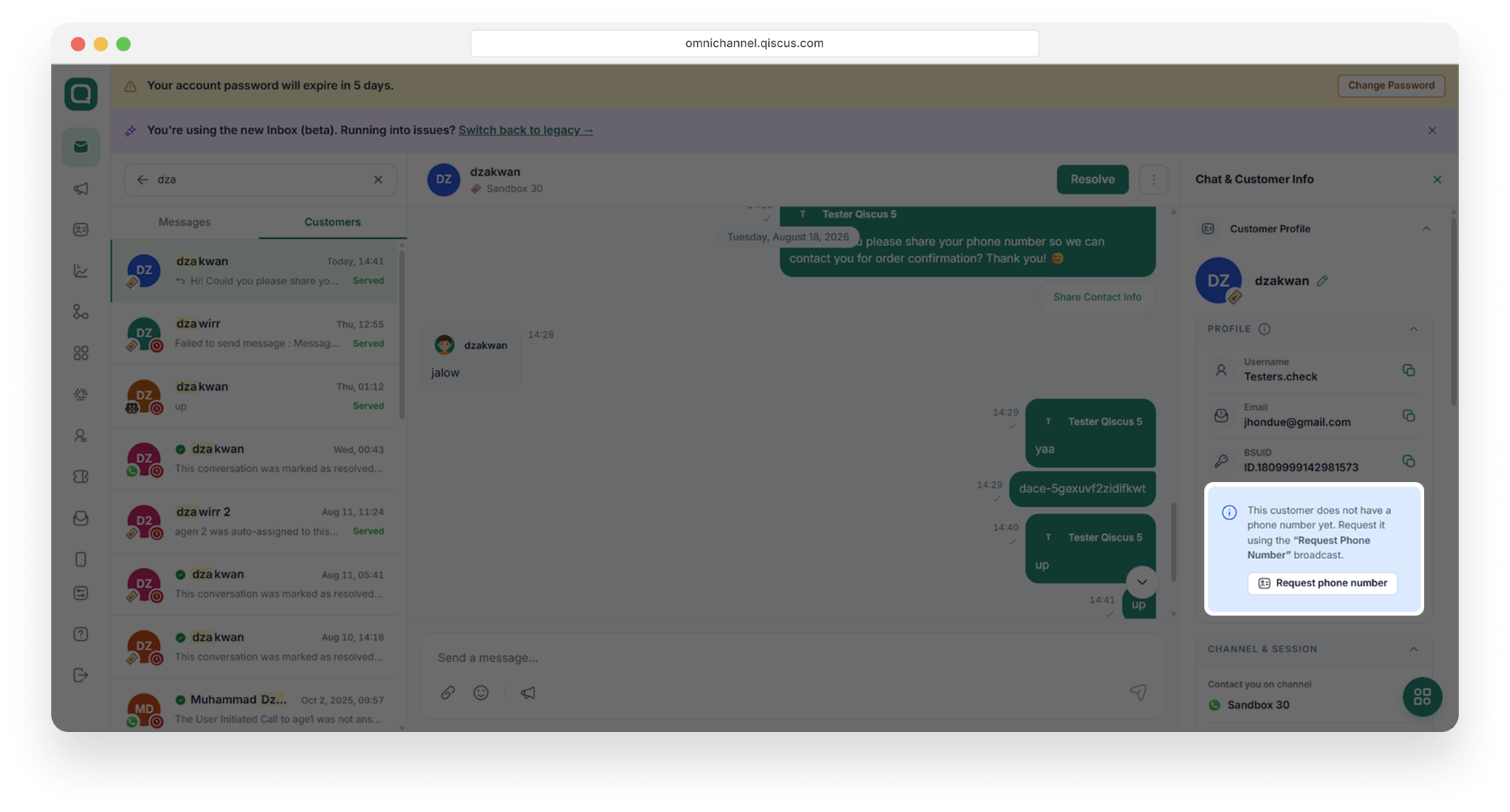
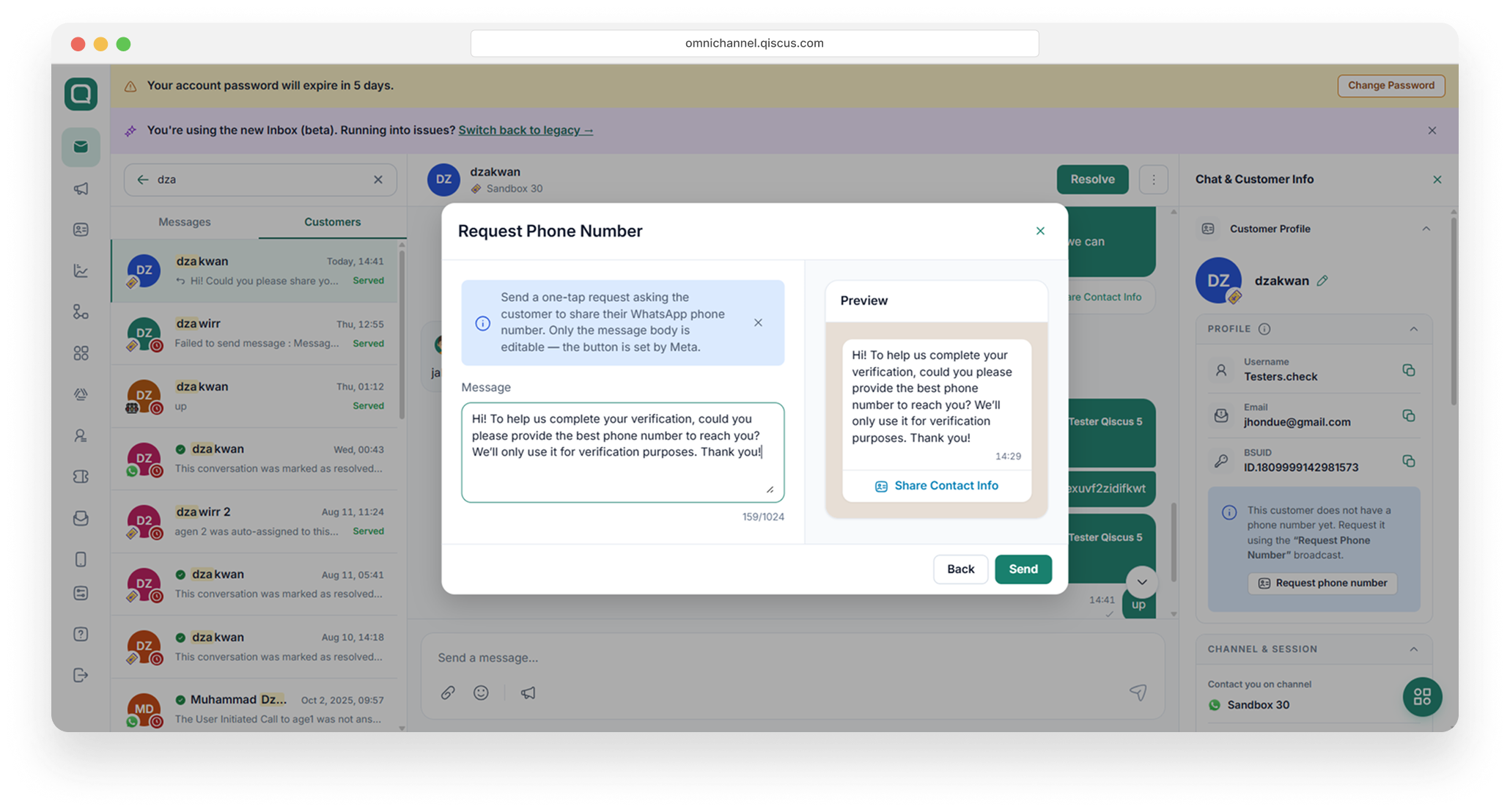
3. In the Request Phone Number dialog, type your Message (up to 1,024 characters). The Preview on the right shows the message together with the fixed Share Contact Info button. Then click Send
4. The interactive message is delivered to the customer with the Share Contact Info button.
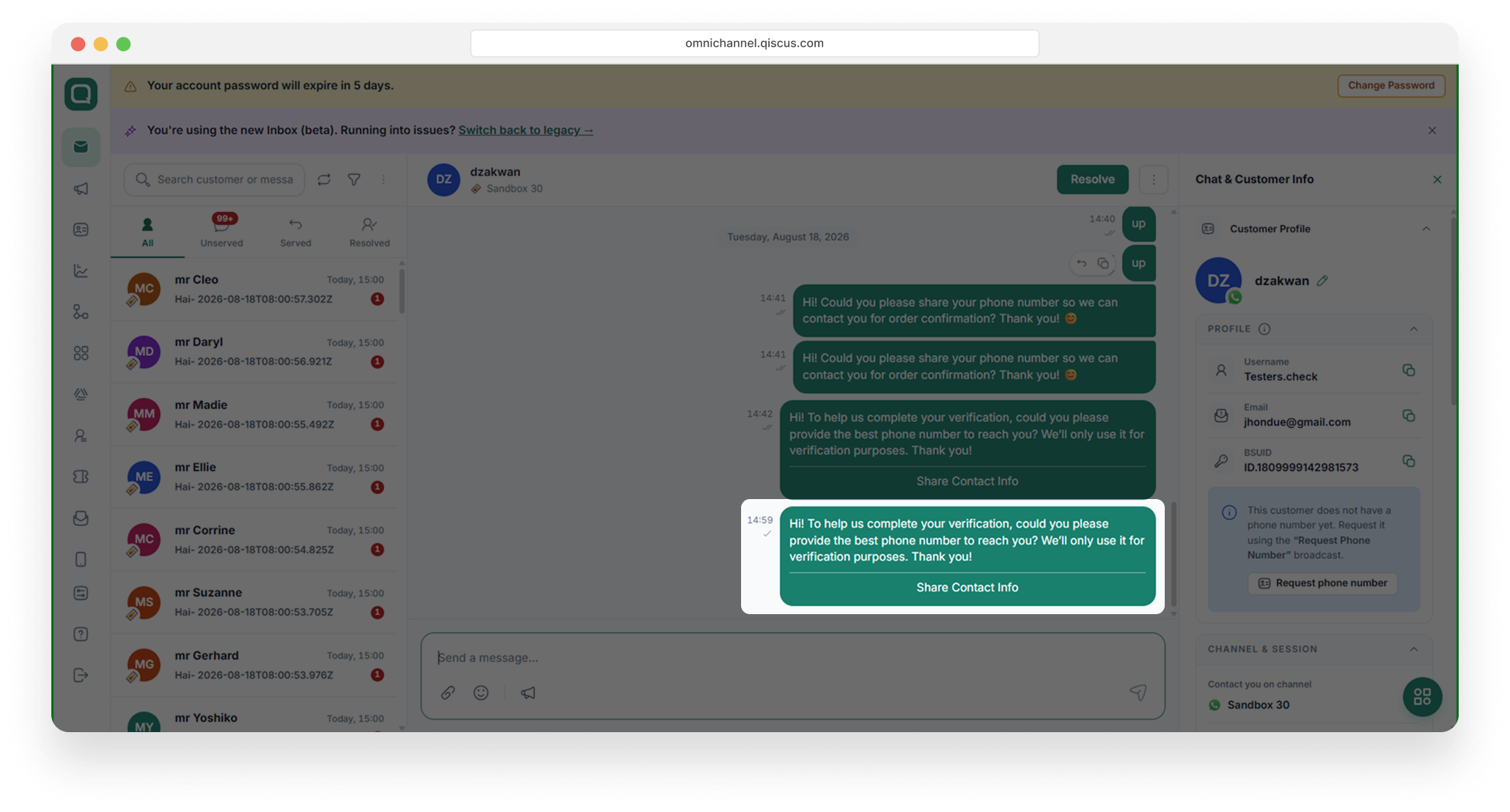
What Happens on the Customer’s Side
The customer receives the message with a Share Contact Info button. When they tap it, WhatsApp asks them to confirm sharing their phone number with your business no typing required. After the customer shares, the phone number appears in the PROFILE section of the customer’s info panel and is saved to the contact.
Quick Comparison
• Template — requires a Meta-approved template; can be sent anytime (even after the session expires); charged per template message.
• Interactive message — no template approval needed; message body written on the spot; sent within the conversation session.
Both methods use the same fixed Share Contact Info button set by Meta.
Customer Blocking with BSUID
The Block Customer feature now supports BSUID as an alternative customer identifier. This enhancement allows businesses to block customers even when a phone number is unavailable or hidden.
Before: Block Customer supported phone number-based identification only.
After: Block Customer supports both phone number and BSUID-based identification.
CDP (Customer Data Platform)
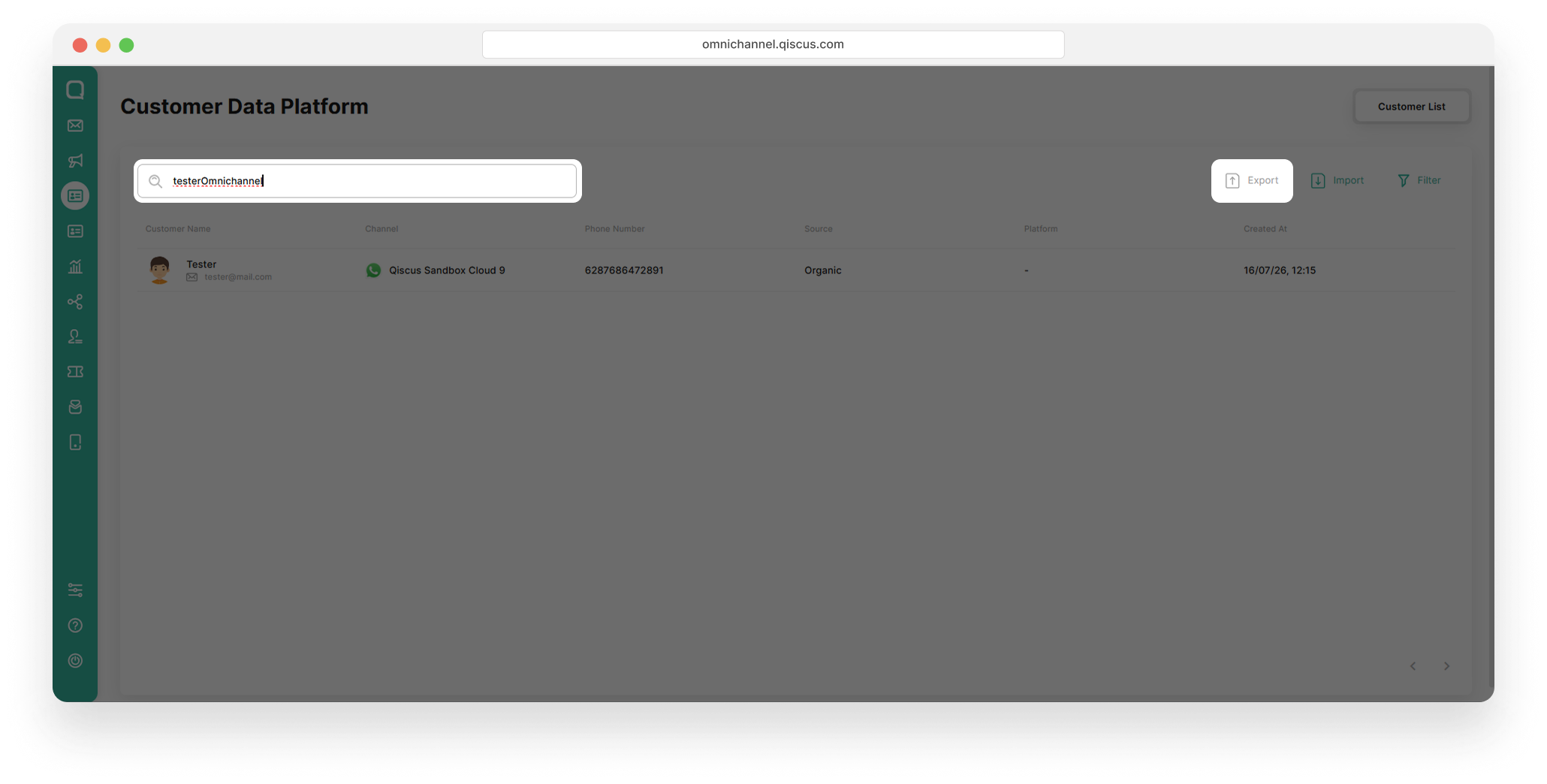
On the page Customer Data Platform (CDP) now supports BSUID. The customer data management view has been updated with a new BSUID column, adding information username on profile detail customer and searching by username on the search field. Ensuring that every customer record, both existing and newly added, is documented completely and consistently.
Customer List
The Customer List allows businesses to search for specific customers using the search field based on username or phone number. The page also supports username and BSUID data in customer export and import functions.
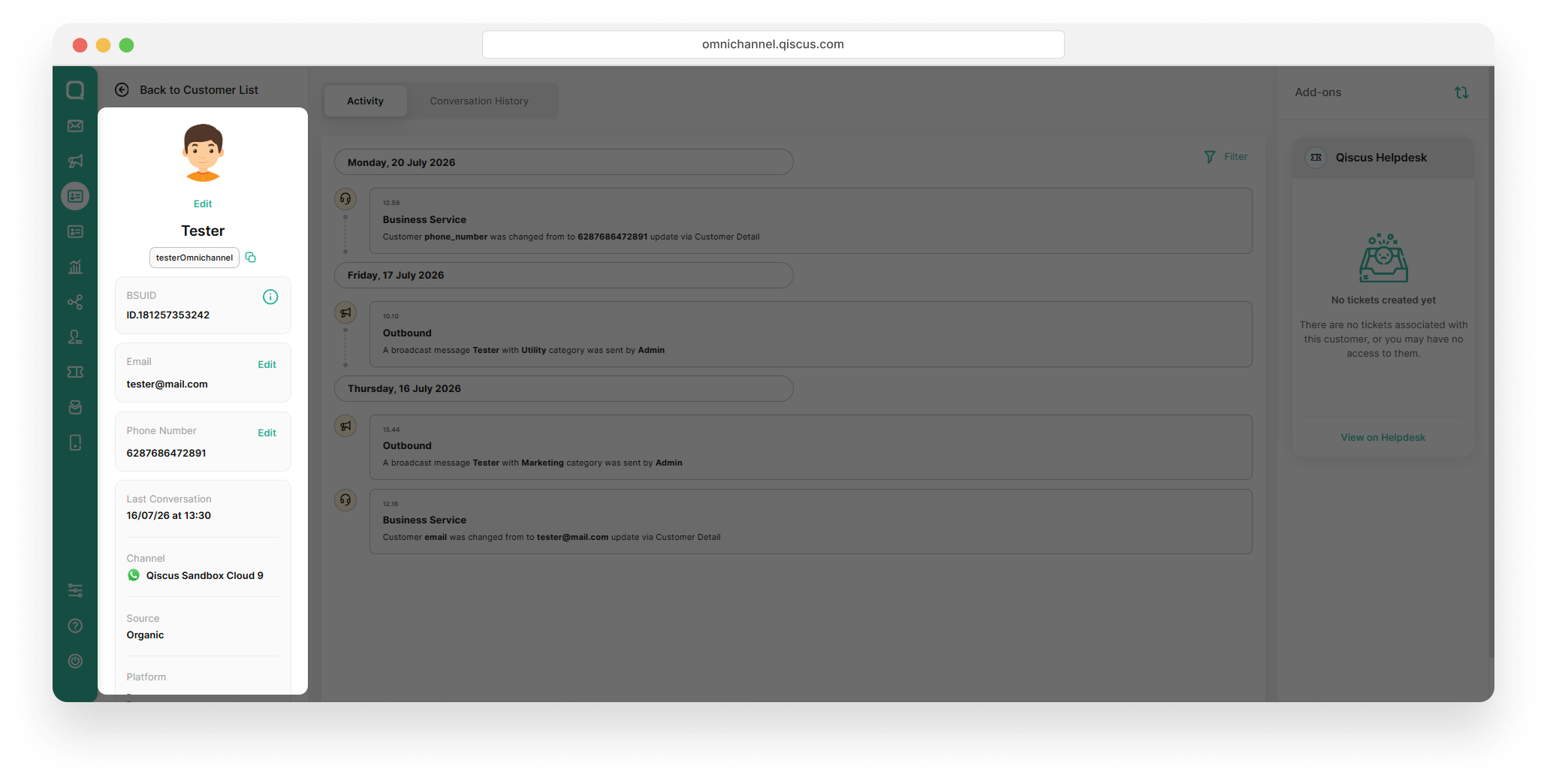
Customer detail
To view a customer's complete information, click their name to open the detail page. This page displays comprehensive data including:
Username and BSUID
Phone number
Last conversation
Channel, source, and platform
Customer activity log {perbaharui}
Customize WhatsApp Profile
To support this feature, we provide a flexible way for your business to customize your profile and define your business name according to your preferences. This menu is available on the WhatsApp Profile Integration page, which consists of two sections: Profile and Username, as outlined below.
Section Profile
In the Profile section, you can customize your business profile details such as the profile photo, description, email, business address, business description, and generate your business URL.
Section Username
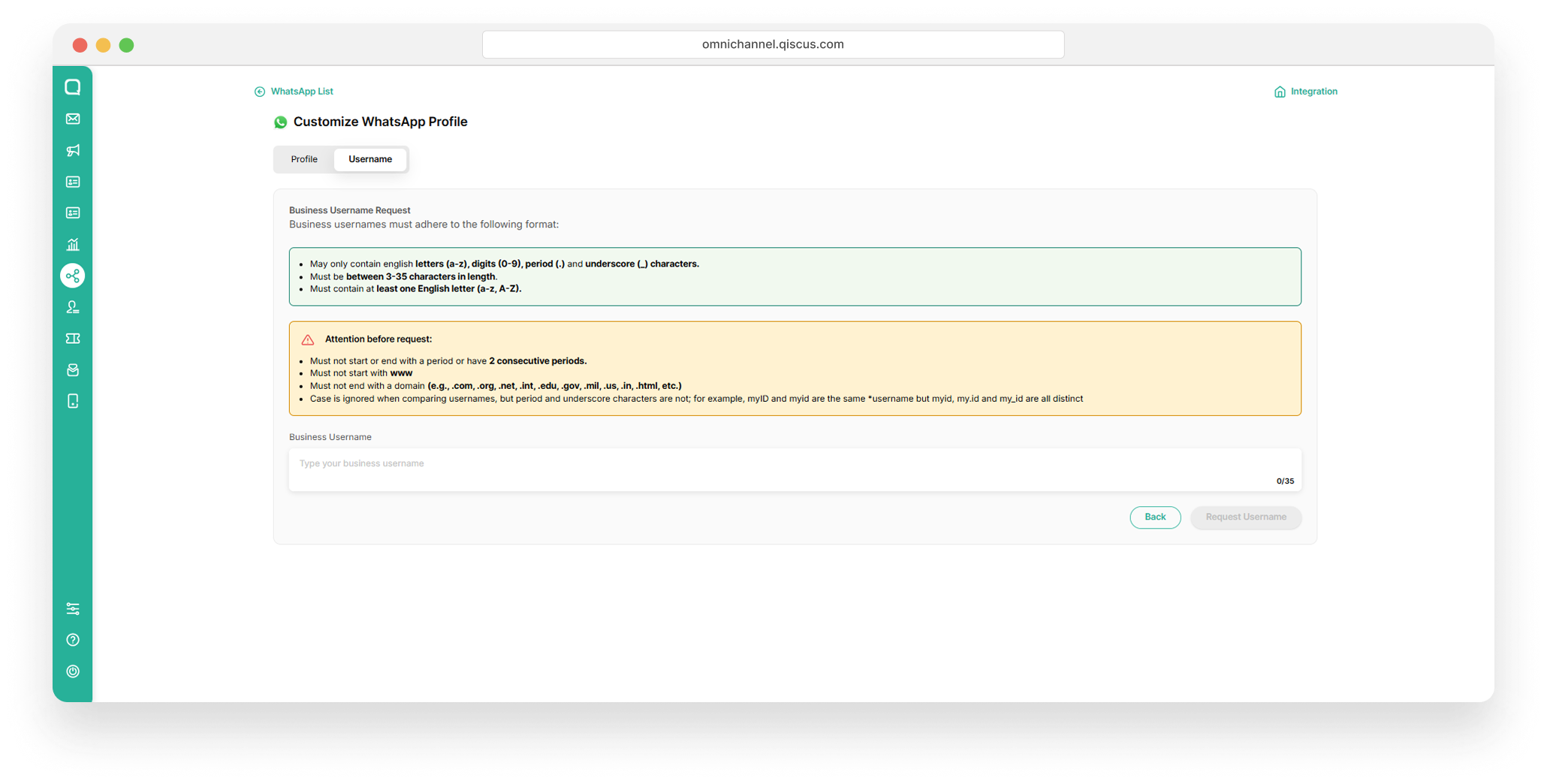
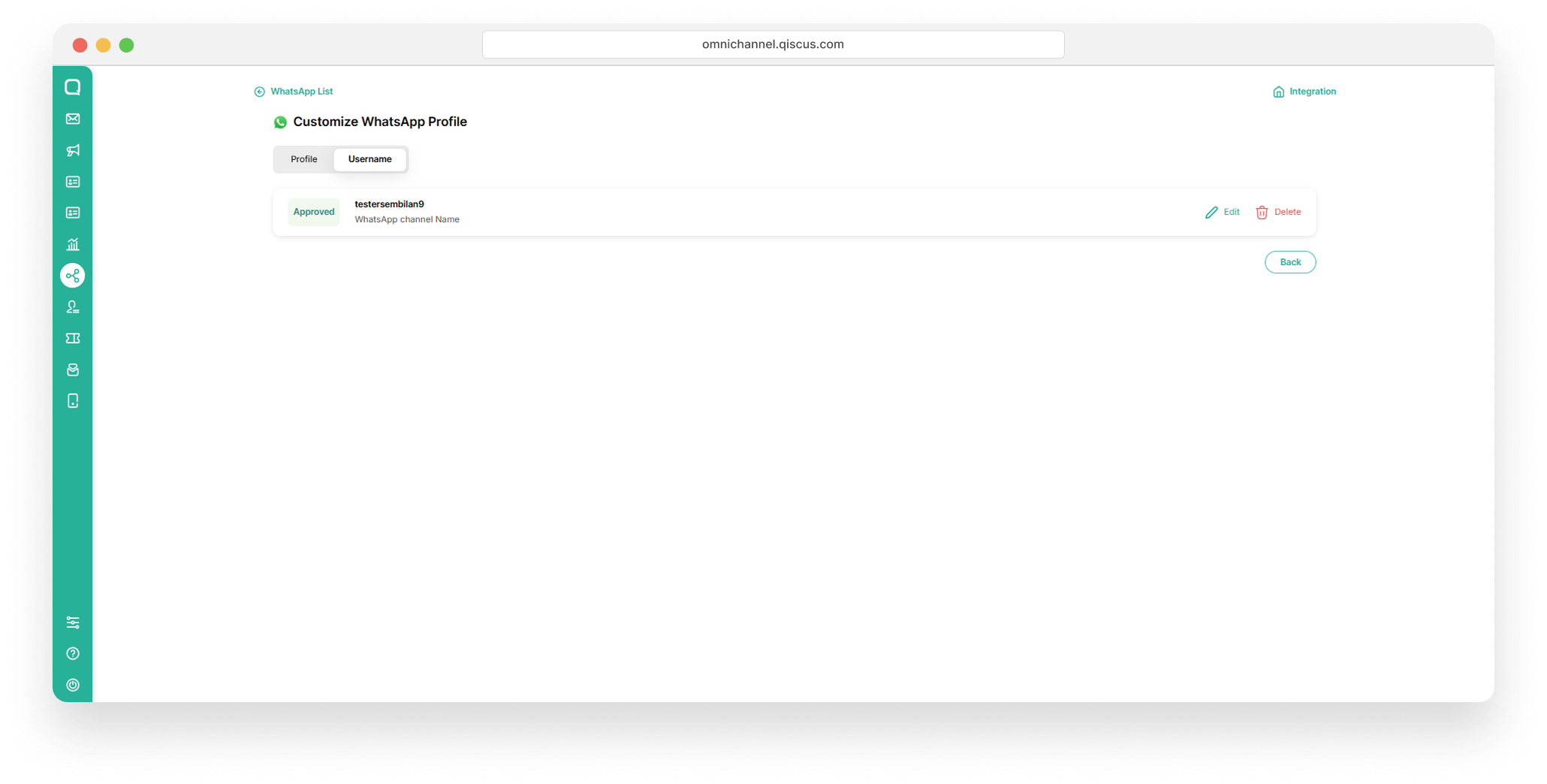
In the Username section, you can customize your business username by submitting a request in the username field. The username must meet certain requirements for availability. Once submitted, Meta will review your request to ensure the username is unique. This process may take some time, and if approved, the username will be assigned with a “Reserved” status.
Webhook Update
Our platform includes the new payload data in all customer-related webhooks. BSUID and username fields are now available in every inbound webhook.
Impacted Webhooks:
Bot Webhook
Custom Agent Allocation Webhook
Custom Button
Mark As Resolved
New Session Webhook
user_id reflects the configured primary identifier. Phone number by default for now and for BSUID is waiting Meta global release. wa_bsuid always contains the BSUID regardless of configuration. For phone-less customers, user_id and wa_bsuid will contain the same BSUID value.
WhatsApp Webhook Forwarder
The WhatsApp Webhook Forwarder relays incoming Meta webhook events to your configured endpoint. To set up your forwarding URL, refer to Setting the Webhooks.
The message.from field is always present in the webhook Qiscus forwards to the client, returning an empty value when unavailable — even if the original webhook from Meta omits the message.from field entirely.
Outbound Menu
The Outbound menu (WhatsApp Broadcast) now lets you reach customers by their WhatsApp username, in addition to their phone number. This works for both a single recipient and CSV-based broadcasts, so you can broadcast to customers even when their phone number is hidden.
Broadcasting by username requires the customer to already exist in the Customer Data Platform (CDP). Qiscus does not message a username directly — it looks up the username in the CDP to find the customer's BSUID, then sends the broadcast using that BSUID. If the username has never been recorded in the CDP (the customer has not interacted with your business and was not imported), there is no BSUID to resolve and the send fails with username not found on this channel. Targeting by phone number or BSUID is not affected.
Choosing the audience
Create a broadcast from Outbound → New Broadcast, give it a name, and on Select Template choose your Sender channel, the Template Category, and a template. Continue to the Choose Audience step, then open the Audience Type dropdown and pick how you want to target recipients:
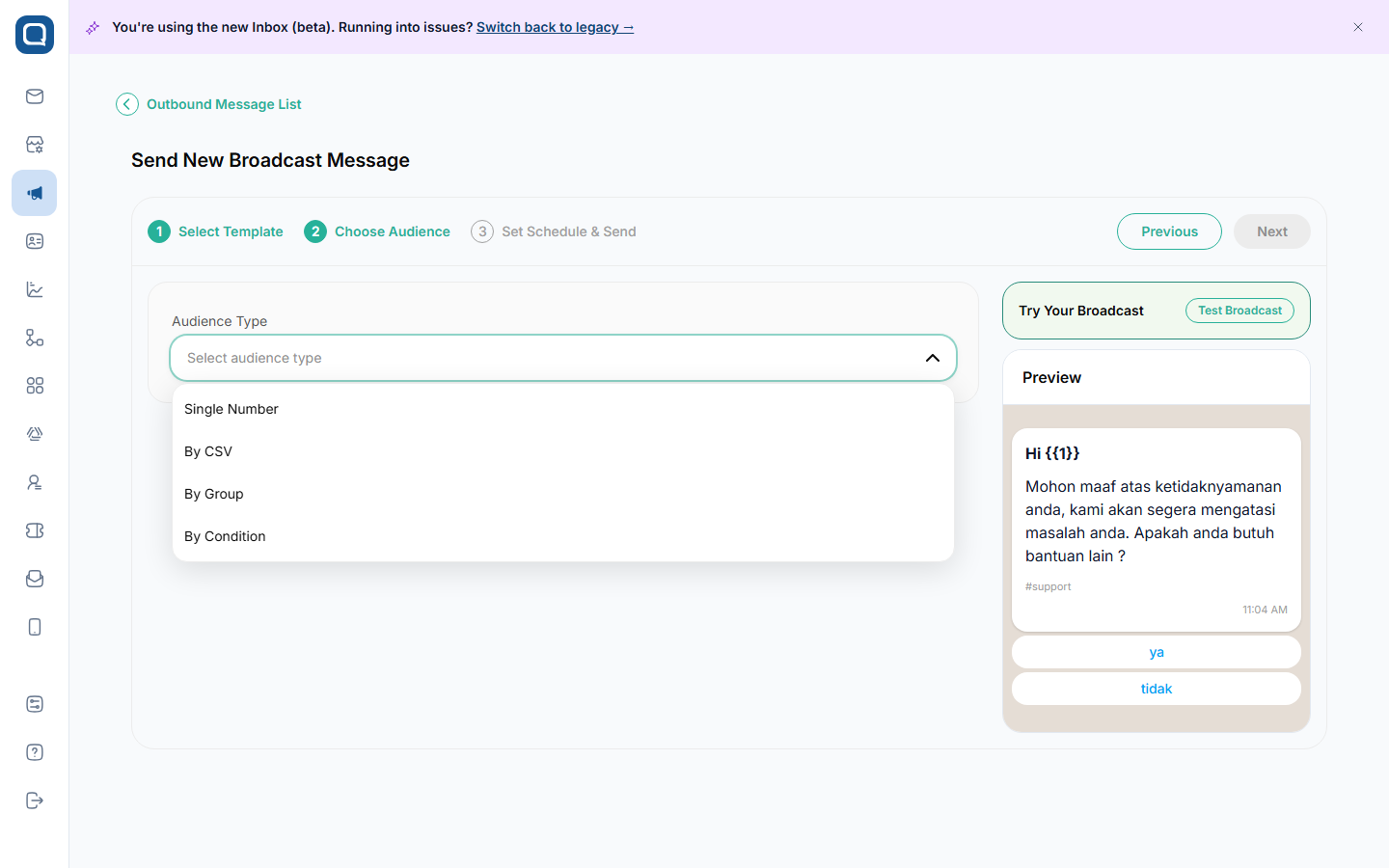
Audience Type | Description |
|---|---|
Single Number | Send to one recipient — by phone number or username. |
By CSV | Upload a CSV file of recipients (phone number, BSUID, or username). |
By Group | Send to a saved customer group. |
By Condition | Send to customers matching property, activity, or source filters. |
Username targeting applies to Single Number and By CSV.
Broadcast to a single username
Set Audience Type to Single Number.
In the Send To dropdown, choose Username (choose Phone Number to send by number as before).
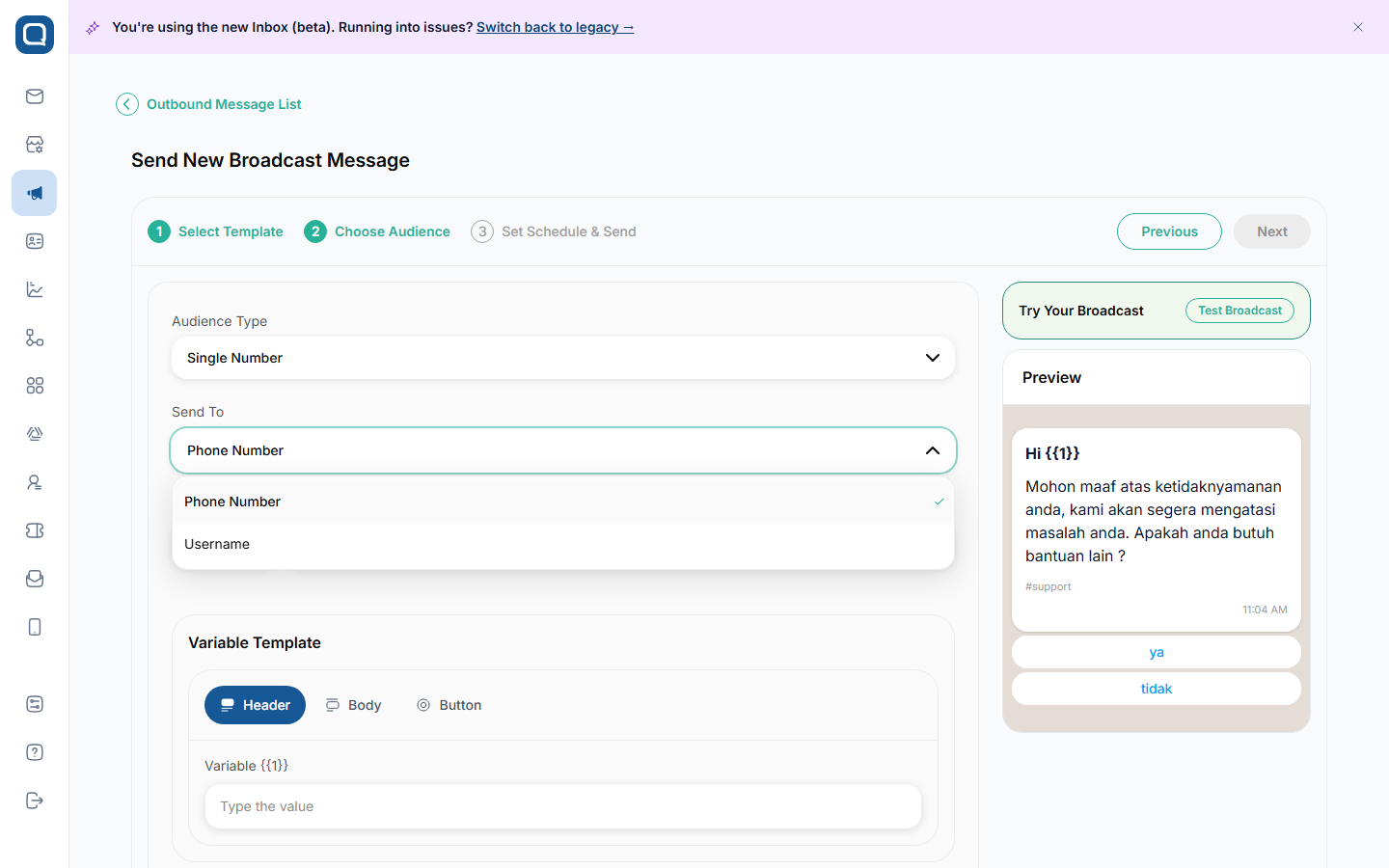
In Customer Username, type the customer's exact WhatsApp username, then pick the customer from the results. The match is exact — enter the full username (for example
Testers.checkaja), not a partial term — and the result shows the customer's phone number.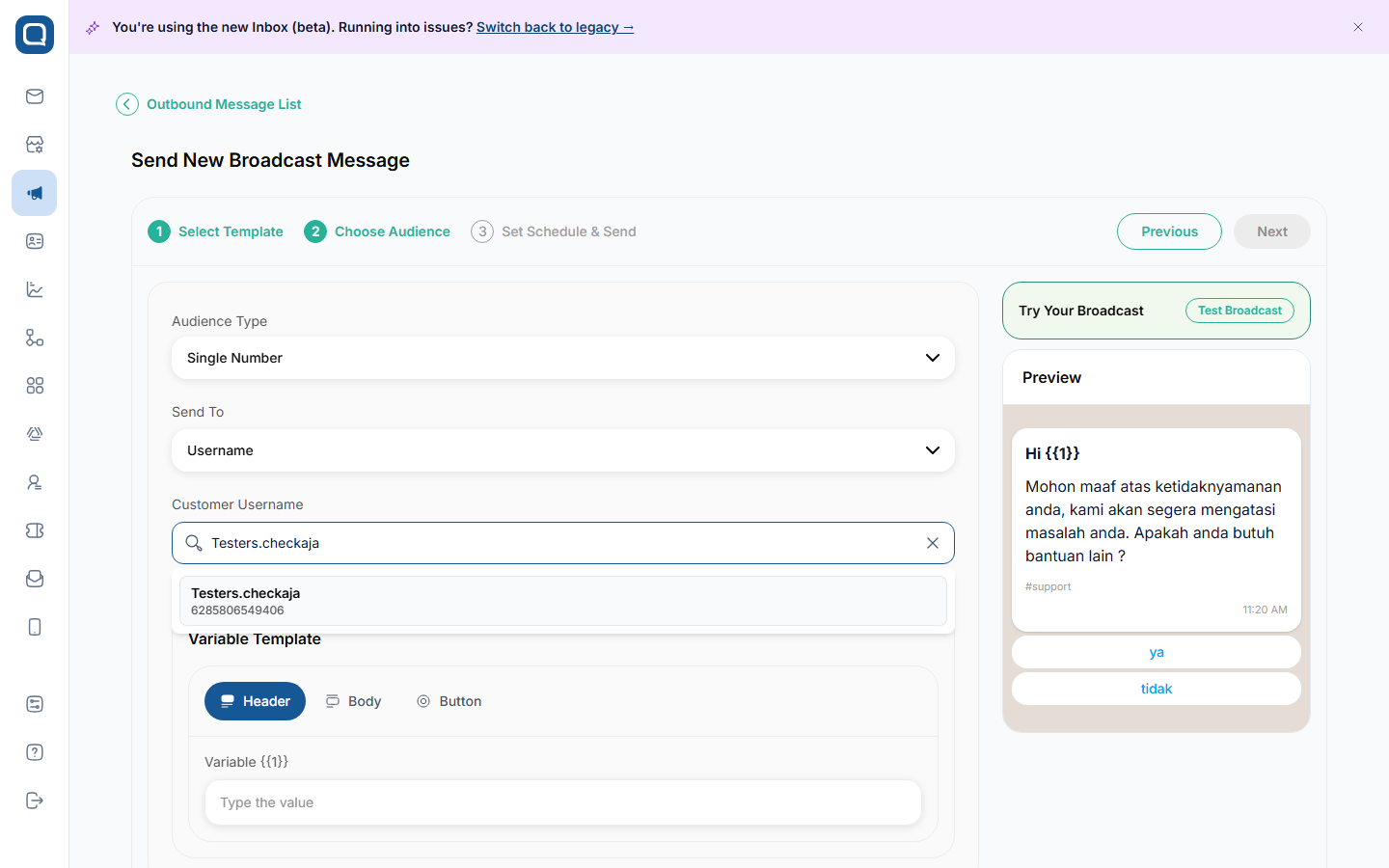
Fill in the Variable Template values, then continue to schedule and send.
The username is resolved to the customer's BSUID at send time. The search matches the full username only — a partial term returns "No customer found". If the username is not found on the selected WhatsApp channel, the broadcast returns username not found on this channel. Customer Username targeted by username are resolved to a BSUID via the Customer Data Platform (CDP). When you send by Phone Number, the value may be a phone number or a BSUID.
Broadcast by CSV
Set Audience Type to By CSV.
Click Download CSV Template, choose your separator (Comma or Semicolon), and the file downloads. It's generated from your selected template.
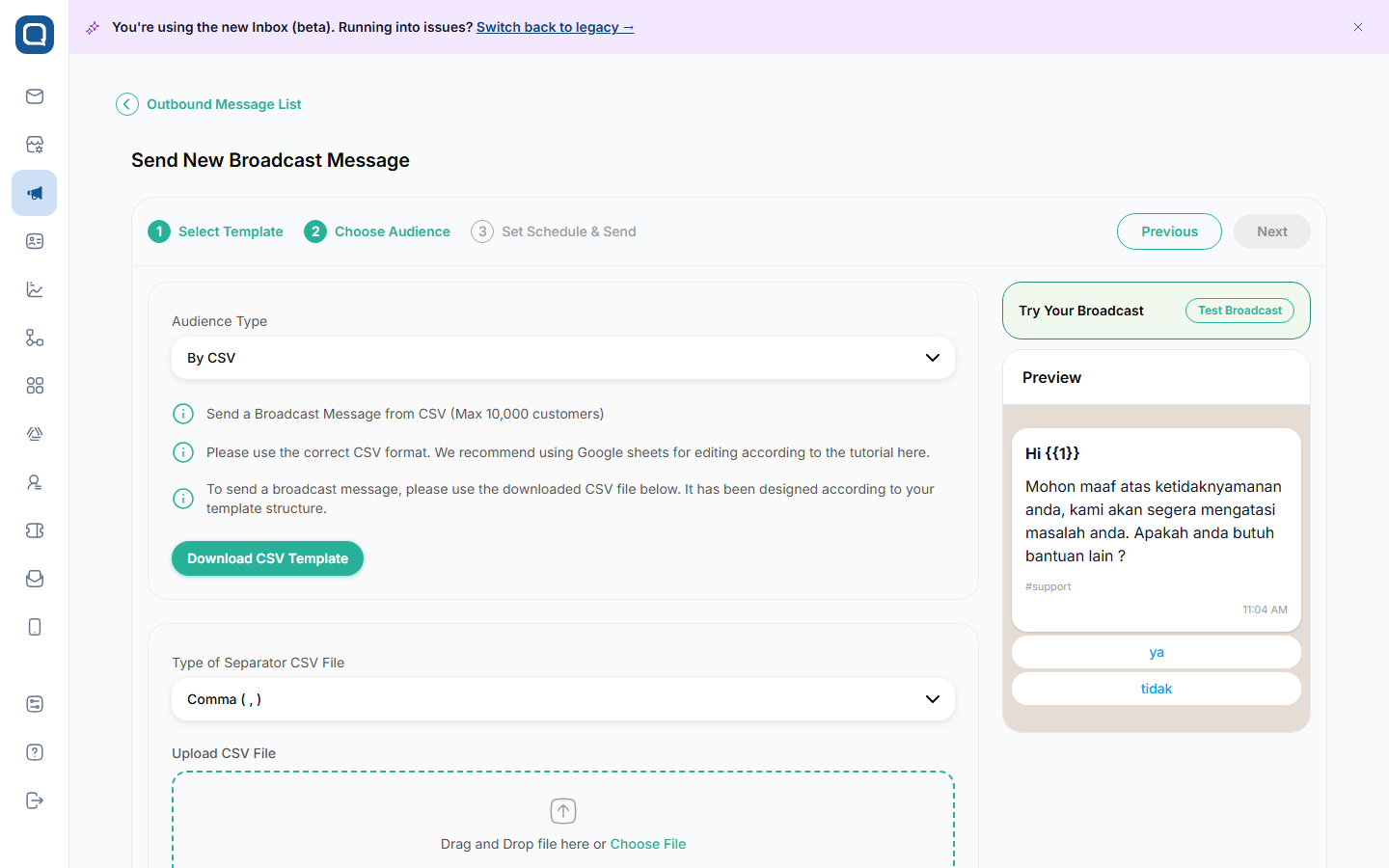
The template includes a phone_number_or_BSUID column and a username column (plus
customer_nameand any template variables). For each row, fill either thephone_number_or_BSUIDcolumn or ausername— not both:phone_number_or_BSUID— the customer's phone number or a BSUID (e.g.,ID.1809xxx).username— the customer's WhatsApp username.
Upload the completed file. The system validates it and shows the estimated charge.
(Optional) Tick Save this audience as a customer group to reuse the same recipients later.
Continue to schedule and send.
Note:
The identifier column is named phone_number_or_BSUID and accepts a phone number or a BSUID. Existing files that still use the older phone_number (or identifier) column name keep working. The username column is optional — leave it empty when you provide an identifier. A username that cannot be resolved is reported as a failed row.
API Update
Send Message
Endpoint: POST /whatsapp/v1/{app_code}/{channel_id}/messages
The to field now supports three types of recipient identifiers — phone number, BSUID, or username. You do not need to change which field you use; simply put the right identifier in to and the platform handles the rest.
Value in | How it's handled |
|---|---|
Phone number (e.g., | Sent directly to Meta as |
BSUID (e.g., | Automatically converted to |
Username (e.g., | Qiscus looks up the BSUID from CDP, then sends via |
No code change is required if you are already using
to. Just pass the identifier you have — phone, BSUID, or username — and the platform resolves it automatically.
Request:
Response (Meta passthrough):
Rules & Constraints:
Format
usernamewithout the@symbol.You may also pass the value explicitly as
recipient(for a BSUID) orusername(for a WhatsApp username) instead ofto— the result is the same.If none of
to,recipient, orusernameis provided →422 key :to, :recipient, or :username is required.If a
usernamecannot be resolved →422 customer not found for username: {username}.Usernames can change at any time. For long-term reliability, store and send the BSUID instead.
Send Marketing Message
Endpoint: POST /whatsapp/v1/{app_code}/{channel_id}/marketing_messages
Marketing messages (MM Lite) accept the same to targeting — phone number, BSUID, or username, resolved the same way. type must be hsm or template.
Request:
Response (Meta passthrough):
Customer Rooms
Endpoint: GET /api/v2/customer_rooms
Request:
Response:
Get Room By Room ID
Endpoint: GET /api/v2/customer_rooms/{room_id}
Request:
Response:
Get Latest Room
Endpoint: GET /api/v2/rooms/latest
Request:
Response:
Get User Info
Endpoint: GET /api/v2/customer_rooms/{room_id}/user_info
Request:
Response:
Get Customer Details
Endpoint: GET /api/v2/customer/{contact_id}
Request:
Response:
List Customers
Endpoint: GET /api/v2/customer
Request:
Response:
Identify Customer
Endpoint: POST /api/v2/admin/customer/identify-customer
Request:
Response:
Add Customer (Contact)
Endpoint: POST /api/v2/admin/contacts/add
Request:
Response:
Customer Group Members
Endpoint: GET /api/v2/customer/groups/{group_id}/members
Request:
Response:
Create Custom Activity
Endpoint: POST /api/v2/customer/activity/custom
Request:
Response:
Block Customer
Endpoint: POST /api/v2/admin/customer/block
Request:
Response:
Client Broadcast
Endpoint: POST /api/v3/admin/broadcast/client
You target recipients using one of the fields below — each accepts a phone number, a BSUID, or a username.
Field | Accepts |
|---|---|
| A single phone number or BSUID (e.g., |
| A WhatsApp username — resolved to the customer's BSUID via CDP. |
Use either phone_number/phone_numbers or username, not both. For CSV-based broadcast, the file has a phone_number_or_BSUID column (a phone number or a BSUID; the older phone_number name still works) plus an optional username column.
Request (single recipient in phone_number):
Request (by username):
Response:
Rules & Constraints:
phone_number/phone_numbersandusernameare mutually exclusive →use either phone_number/phone_numbers or username.At least one target is required →
phone_number, phone_numbers or username are required.An unresolved username →
username not found on this channel.phone_numberscan hold at most 20 entries.
Broadcast Logs
Endpoint: GET /api/v2/admin/broadcast_logs/{broadcast_job_id}
Request:
Response:
Important for developers: In broadcast logs,
phone_numberandcustomer_namemay hold a BSUID value. Do not parse them as phone numbers.
WhatsApp Call — Get History
Endpoint: GET /api/v3/admin/call/history/{room_id}
Request:
Response:
WhatsApp Call — Block Customer Call
Endpoint: POST /api/v3/admin/call/block_customer_call
Request:
Response:
WhatsApp Opt-out — Get Customer
Endpoint: GET /api/v2/admin/opt-out/get-customer
A customer's opt-out state is keyed by phone_number or wa_bsuid.
Request:
Response:
Customer Profile — Update
Endpoint: POST /api/v2/customer_profile/update
Request:
Response:
Load Comments
Endpoint: GET https://api.qiscus.com/api/v2.1/rest/load_comments
Request:
Response:
Scenario |
|
|---|---|
Username-only customer (no phone) | Returns a BSUID-based value instead of a phone number. |
Standard customer | Unchanged. |
Get Room By ID
Endpoint: GET https://api.qiscus.com/api/v2/sdk/get_room_by_id
The email field can be BSUID-based in two places: each participants[].email and last_comment.email.
Request:
Response:
Get User Rooms
Endpoint: GET https://api.qiscus.com/api/v2/rest/get_user_rooms
Request:
Response:
Get Room Participants
Endpoint: GET https://api.qiscus.com/api/v2.1/rest/get_room_participants
Request:
Response:
Get or Create Room With Target
Endpoint: POST https://api.qiscus.com/api/v2/rest/get_or_create_room_with_target
The target you send can be a BSUID; the response email can be a BSUID.
Request:
Response:
Post Comment
Endpoint: POST https://api.qiscus.com/api/v2/rest/post_comment
The sender_email you send can be BSUID-based, and the sender email returned can be a BSUID.
Request:
Response: