
The Closed ticket status in Qiscus Helpdesk represents the final stage of a ticket’s lifecycle.
A closed ticket indicates that the issue has been fully resolved and no further action is expected from the support team.
Unlike other statuses (such as Open, Pending, or Solved), Closed tickets are treated as finalized records and have specific behavioral rules that prevent further interaction on the same ticket.
A. Purpose of Closed Status
The Closed ticket status is designed to act as a final and locked state for a ticket. Its primary purposes are:
Prevent ticket reopening. Once a ticket is closed, it is locked and cannot be reopened. Any new reply from the requester will automatically create a new ticket instead of reopening the existing one.
Prevent mixed or unrelated follow-ups. Closed status prevents requesters from replying with a different or unrelated context on an already resolved ticket, ensuring each ticket represents a single, clear issue.
Maintain clean Resolution SLA metrics. By separating new conversations into new tickets, the system ensures:
Resolution SLA reflects only the original issue
SLA is not extended or dragged by follow-up messages with different contexts
Reporting remains accurate and meaningful
Overall, the Closed status helps maintain context clarity, SLA accuracy, and clean ticket history by enforcing a strict separation between resolved issues and new requests.
B. Ticket Behavior When Closed
When a ticket reaches the Closed status, it becomes a final, locked state with specific behavior in Qiscus Helpdesk.
1. How Tickets Become Closed
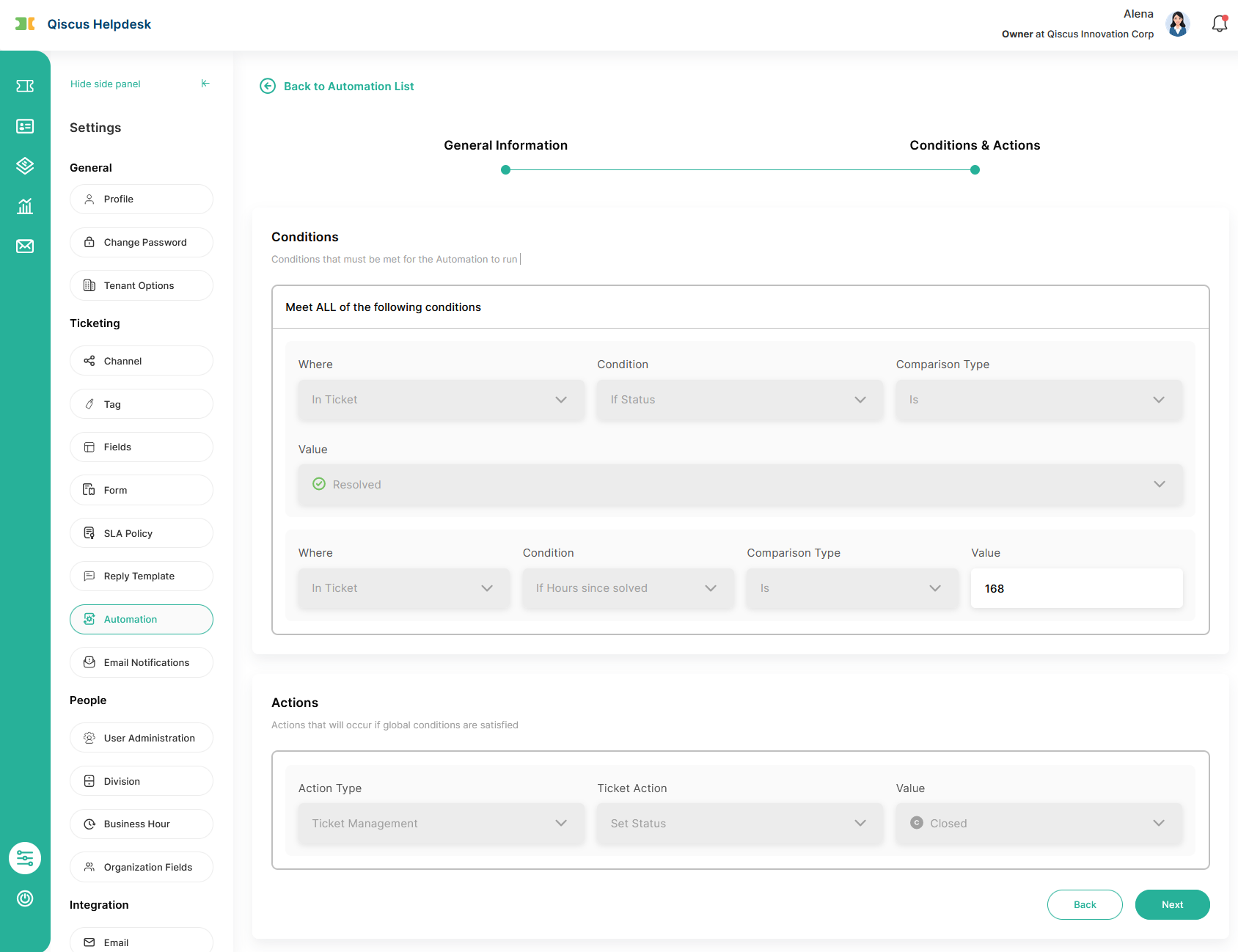
Tickets are automatically closed by a time-based automation after they stay in Solved status for a certain period (for example, 7 days by default).
Admins can adjust how long after Solved a ticket will be closed (within a limited range), but closing is always done by automation, not manually.
Internal users cannot set a ticket directly to Closed, either from:
Bulk actions on the ticket list, or
Status changes inside the ticket details
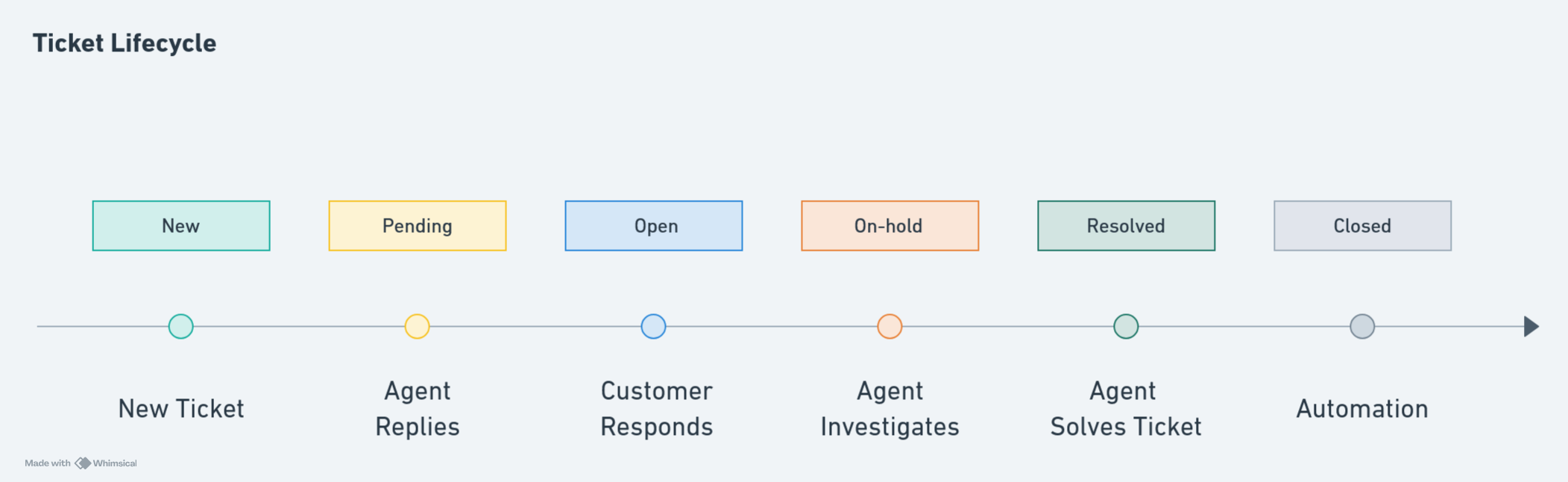
This ensures a consistent lifecycle: New → Pending → Open → On-hold → Solved → Closed.
2. Ticket List Behavior
When a ticket is Closed:
It does not appear in the regular All Tickets view.
It is only listed under a dedicated Closed ticket view.
In the Closed ticket list:
Tickets are read-only for bulk actions (no checkbox / no bulk edit)
Users can open a closed ticket to review its history, but not update it as an active case
This helps separate active workloads from historical records.
3. Closed Ticket Permissions by Role
Role | What They Can Do | What They Cannot Do |
|---|---|---|
Agent |
|
|
Supervisor / Admin / Owner |
|
|
Requester / CC’d User |
|
|
4. Follow-Up Behavior
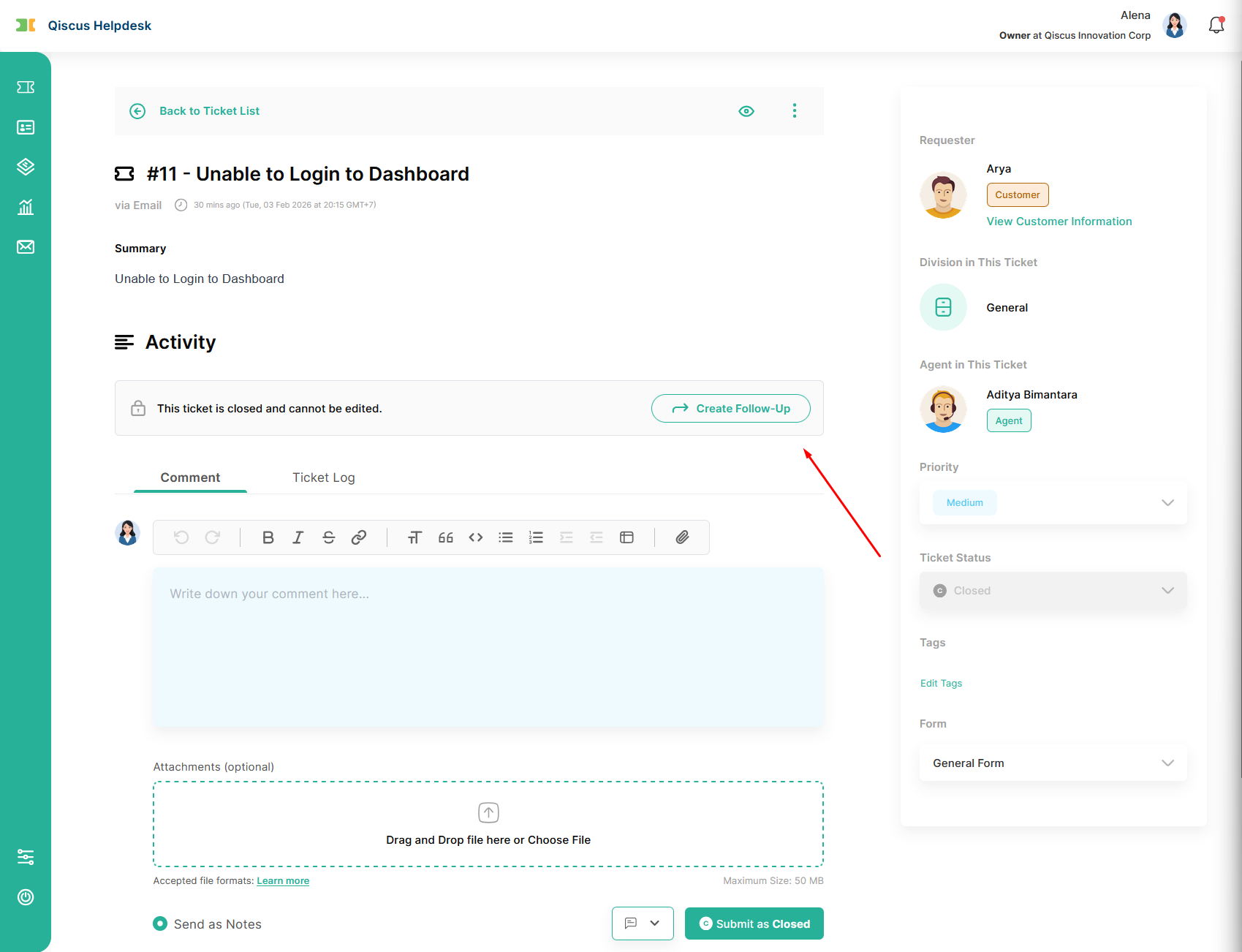
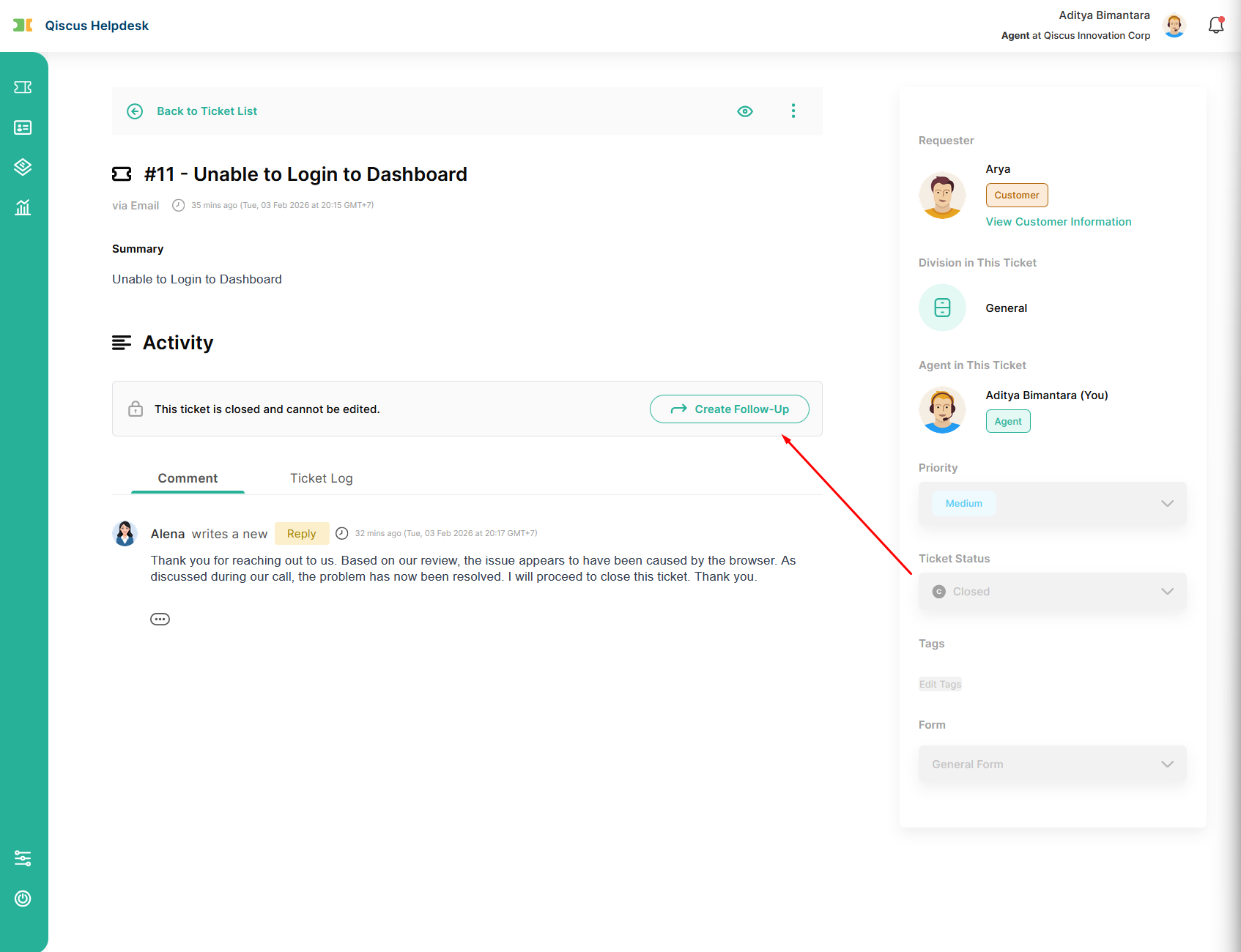
When a ticket is in Closed status, any further conversation is handled through a follow-up ticket. This ensures new requests are tracked separately while keeping the original ticket intact.
Follow-Up from Helpdesk (Internal Users)
For internal Helpdesk users:
When opening a Closed ticket, a Create Follow-Up option is available.
Creating a follow-up will:
Open a new ticket
Automatically copy relevant information from the original ticket (such as form, requester, assignee, division, and priority)
Add a reference to the original ticket in the new ticket’s title and summary
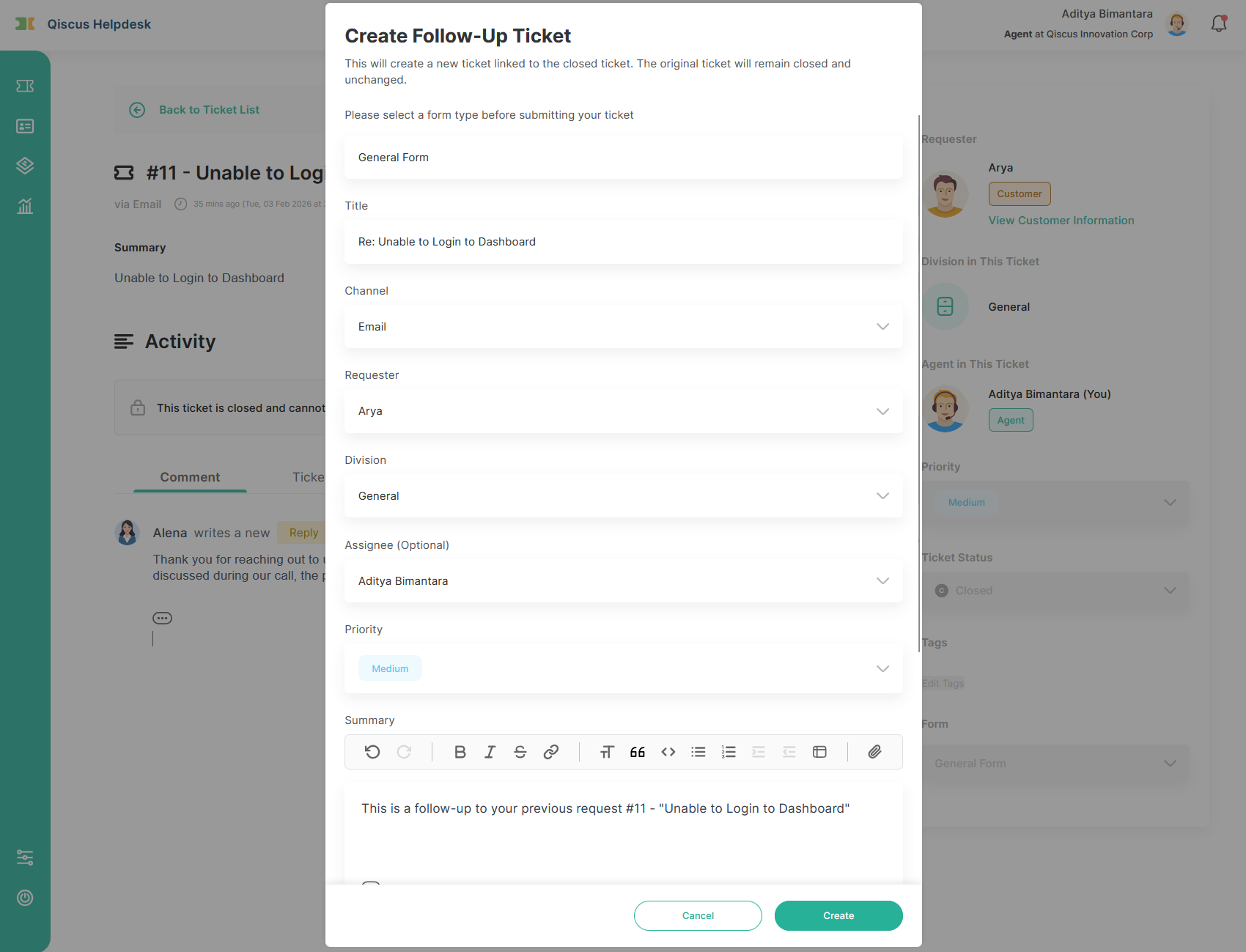
After creation, the user is redirected to the newly created follow-up ticket.
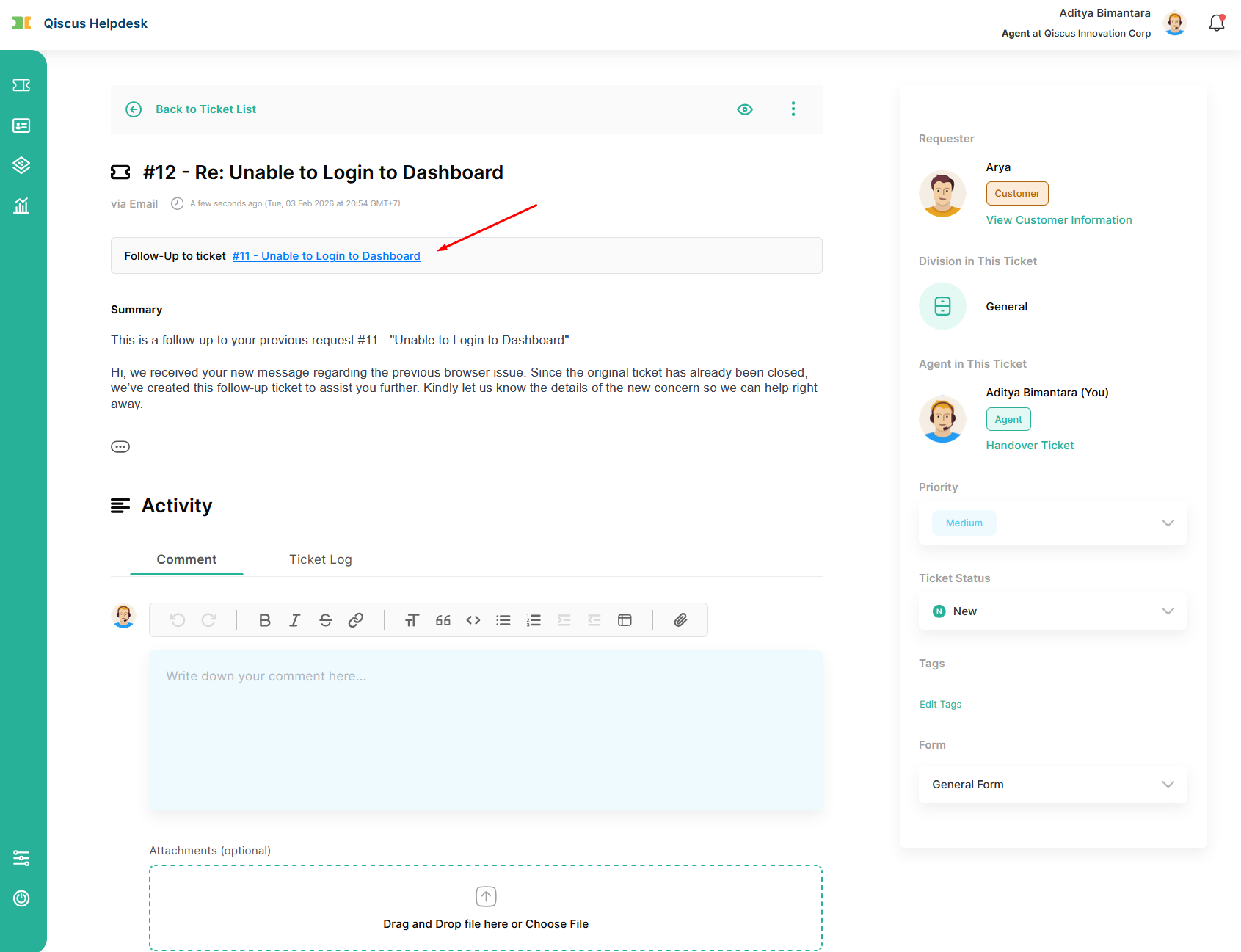
The follow-up ticket will contain a link back to the original closed ticket. The original closed ticket itself remains unchanged and does not show a link to the follow-up ticket.
Follow-Up from Help Center or Email (External Users)
For requesters or CC’d users:
Closed tickets appear as Solved in the ticket list.
When opening a closed ticket:
The ticket content is read-only
A clear option is provided to create a follow-up ticket
Creating a follow-up will:
Open a new ticket with a reference to the original request
Preserve the relationship between the old and new tickets for context
If a requester replies to a Closed ticket via email, the system will:
Automatically create a new follow-up ticket
Link it back to the original closed ticket
This ensures that new messages do not continue or reopen completed tickets.
Follow-up tickets are always treated as new tickets with their own lifecycle and SLA.
Links between the original ticket and follow-up tickets are shown for reference, but access depends on user permissions.
In certain views (such as organization-wide access), external users may only see closed tickets as historical records and may not see the follow-up option.
5. API Behavior for Closed Tickets
Qiscus Helpdesk provides API support for managing tickets in Closed status, primarily to support integrations, automation, and external systems. While the Helpdesk dashboard treats Closed tickets as a final and mostly read-only state, the API offers more flexibility. To avoid unintended side effects on reporting and SLA accuracy, it is important to understand how Closed tickets behave when accessed through the API.
Area | Behavior |
|---|---|
Create Ticket | API cannot create a new ticket with initial status Closed. Use an active status (e.g. Open or Solved) when creating tickets. |
Update Closed Ticket | After a ticket is Closed, most fields can still be updated via API. While the dashboard UI restricts editing, the API does not fully enforce the same limitations. |
Set Status to Closed | You can update an existing ticket’s status to Closed via API. Once updated, the ticket follows standard Closed ticket behavior in the UI. |
Create Follow-Up via API | You can create a follow-up ticket via API by referencing the original ticket (for example using a parent or follow-up identifier). The new ticket will be linked to the original Closed ticket. |
Parent Ticket in Payloads | Follow-up relationships are included in API responses, webhook payloads, and Help Center API, enabling integrations to track related tickets. |
C. Best Practices
To use Closed status effectively, we recommend:
Close tickets only after confirmation that the issue is resolved
Avoid closing tickets prematurely to prevent unnecessary follow-ups
Use follow-up tickets to handle new or extended issues
Educate agents that Closed is a final state, not a pause
D. Summary
The Closed ticket status is a final, read-only state used to indicate that a support case has been fully resolved. Once closed, tickets cannot be replied to, reopened, or modified, ensuring clean workflows, accurate metrics, and reliable historical records. Any customer response after closure will automatically create a new follow-up ticket, allowing teams to continue support without disrupting completed cases.