
Qiscus Email Marketing
latest
Title
Message
Create new category
What is the title of your new category?
Edit page index title
What is the title of the page index?
Edit category
What is the new title of your category?
Edit link
What is the new title and URL of your link?
Dashboard
AI Tools
Copy Markdown
Open in ChatGPT
Open in Claude

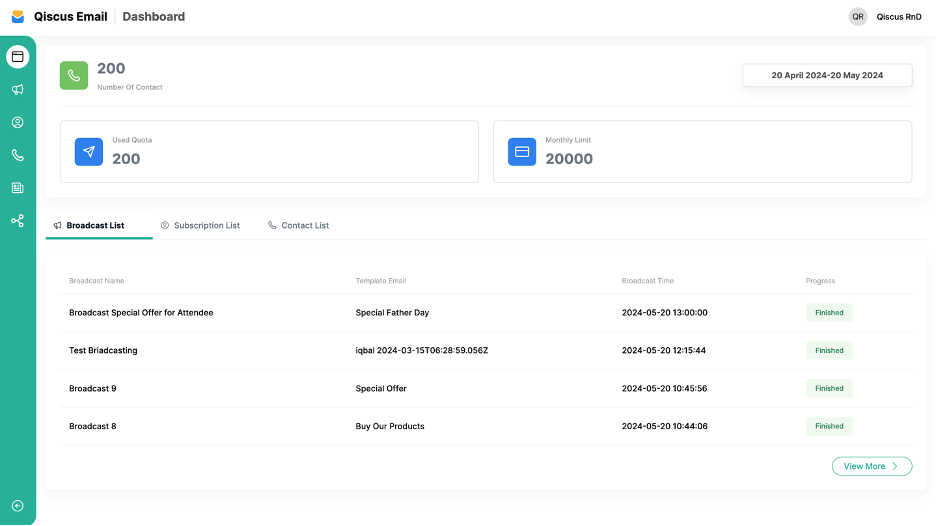
The Qiscus Email Marketing Dashboard is the first page that displays summary information about the activities carried out by Qiscus Email Marketing. On this dashboard, there is information you can see and filter based on the Date Filter feature provided, such as:
- Number of Contacts: The total number of contacts you have.
- Used Quota: The amount of quota used for broadcasts, calculated based on the cost of sending a broadcast message to each email address.
- Monthly Limits: The monthly quota limit for sending broadcast messages.
Several menus are available on the dashboard. Click below for more detailed explanations:
Type to search, ESC to discard
Last updated on
Was this page helpful?
Next to read:
Integration SettingQiscus Technology
Discard Changes
Do you want to discard your current changes and overwrite with the template?
Archive Synced Block
Message
Create new Template
What is this template's title?
Delete Template
Message